PO update API
|
|
|
0
comments
set serveroutput on;
-- After the API completes, do not forget to commit if the result is 1
-- and rollback if the result is 0.
DECLARE
l_result NUMBER;
l_api_errors PO_API_ERRORS_REC_TYPE;
BEGIN
-- This needs to be changed according to your environment setup.
FND_GLOBAL.apps_initialize ( user_id => 1318,
resp_id => 50578,
resp_appl_id => 201 );
-- Record an acceptance of Y for PO 1261.
l_result := PO_CHANGE_API1_S.record_acceptance(
x_po_number => 1261,
x_release_number => null,
x_revision_number => 0,
x_action => 'NEW',
x_action_date => null,
x_employee_id => 588,
x_accepted_flag => 'Y',
x_acceptance_lookup_code => 'On Schedule',
x_note => 'All valid',
x_interface_type => 'APITEST',
x_transaction_id => null,
version => '1.0');
IF (l_result <> 1) THEN
-- Handle the errors in the PO_INTERFACE_ERRORS table.
END IF;
-- Change the quantity to 5 on line 1, shipment 1 of PO 1263.
-- we are launching approval proceess it will be with new revision number after update
-- using this API we can only change price,qunatity,promise_date
l_result := PO_CHANGE_API1_S.update_po (
x_po_number => 1263,
x_release_number => 1,
x_revision_number => 1,
x_line_number => 1,
x_shipment_number => 1,
new_quantity => 5,
new_price => NULL,
new_promised_date => NULL,
launch_approvals_flag =>'Y',
update_source => NULL,
version => '1.0',
x_override_date => NULL,
x_api_errors => l_api_errors,
p_buyer_name => null
);
IF (l_result <> 1) THEN
-- Display the errors
FOR i IN 1..l_api_errors.message_text.COUNT LOOP
dbms_output.put_line ( l_api_errors.message_text(i) );
END LOOP;
END IF;
END;
-- After the API completes, do not forget to commit if the result is 1
-- and rollback if the result is 0.
DECLARE
l_result NUMBER;
l_api_errors PO_API_ERRORS_REC_TYPE;
BEGIN
-- This needs to be changed according to your environment setup.
FND_GLOBAL.apps_initialize ( user_id => 1318,
resp_id => 50578,
resp_appl_id => 201 );
-- Record an acceptance of Y for PO 1261.
l_result := PO_CHANGE_API1_S.record_acceptance(
x_po_number => 1261,
x_release_number => null,
x_revision_number => 0,
x_action => 'NEW',
x_action_date => null,
x_employee_id => 588,
x_accepted_flag => 'Y',
x_acceptance_lookup_code => 'On Schedule',
x_note => 'All valid',
x_interface_type => 'APITEST',
x_transaction_id => null,
version => '1.0');
IF (l_result <> 1) THEN
-- Handle the errors in the PO_INTERFACE_ERRORS table.
END IF;
-- Change the quantity to 5 on line 1, shipment 1 of PO 1263.
-- we are launching approval proceess it will be with new revision number after update
-- using this API we can only change price,qunatity,promise_date
l_result := PO_CHANGE_API1_S.update_po (
x_po_number => 1263,
x_release_number => 1,
x_revision_number => 1,
x_line_number => 1,
x_shipment_number => 1,
new_quantity => 5,
new_price => NULL,
new_promised_date => NULL,
launch_approvals_flag =>'Y',
update_source => NULL,
version => '1.0',
x_override_date => NULL,
x_api_errors => l_api_errors,
p_buyer_name => null
);
IF (l_result <> 1) THEN
-- Display the errors
FOR i IN 1..l_api_errors.message_text.COUNT LOOP
dbms_output.put_line ( l_api_errors.message_text(i) );
END LOOP;
END IF;
END;

Stock Basics 101
|
|
|
0
comments
About Companies Financials
News Feed
Industries to choose.
Money Holding.
Stocks to watch this week.
PO update API
Friday, January 7, 2011
| | | 0 comments
set serveroutput on;
-- After the API completes, do not forget to commit if the result is 1
-- and rollback if the result is 0.
DECLARE
l_result NUMBER;
l_api_errors PO_API_ERRORS_REC_TYPE;
BEGIN
-- This needs to be changed according to your environment setup.
FND_GLOBAL.apps_initialize ( user_id => 1318,
resp_id => 50578,
resp_appl_id => 201 );
-- Record an acceptance of Y for PO 1261.
l_result := PO_CHANGE_API1_S.record_acceptance(
x_po_number => 1261,
x_release_number => null,
x_revision_number => 0,
x_action => 'NEW',
x_action_date => null,
x_employee_id => 588,
x_accepted_flag => 'Y',
x_acceptance_lookup_code => 'On Schedule',
x_note => 'All valid',
x_interface_type => 'APITEST',
x_transaction_id => null,
version => '1.0');
IF (l_result <> 1) THEN
-- Handle the errors in the PO_INTERFACE_ERRORS table.
END IF;
-- Change the quantity to 5 on line 1, shipment 1 of PO 1263.
-- we are launching approval proceess it will be with new revision number after update
-- using this API we can only change price,qunatity,promise_date
l_result := PO_CHANGE_API1_S.update_po (
x_po_number => 1263,
x_release_number => 1,
x_revision_number => 1,
x_line_number => 1,
x_shipment_number => 1,
new_quantity => 5,
new_price => NULL,
new_promised_date => NULL,
launch_approvals_flag =>'Y',
update_source => NULL,
version => '1.0',
x_override_date => NULL,
x_api_errors => l_api_errors,
p_buyer_name => null
);
IF (l_result <> 1) THEN
-- Display the errors
FOR i IN 1..l_api_errors.message_text.COUNT LOOP
dbms_output.put_line ( l_api_errors.message_text(i) );
END LOOP;
END IF;
END;
-- After the API completes, do not forget to commit if the result is 1
-- and rollback if the result is 0.
DECLARE
l_result NUMBER;
l_api_errors PO_API_ERRORS_REC_TYPE;
BEGIN
-- This needs to be changed according to your environment setup.
FND_GLOBAL.apps_initialize ( user_id => 1318,
resp_id => 50578,
resp_appl_id => 201 );
-- Record an acceptance of Y for PO 1261.
l_result := PO_CHANGE_API1_S.record_acceptance(
x_po_number => 1261,
x_release_number => null,
x_revision_number => 0,
x_action => 'NEW',
x_action_date => null,
x_employee_id => 588,
x_accepted_flag => 'Y',
x_acceptance_lookup_code => 'On Schedule',
x_note => 'All valid',
x_interface_type => 'APITEST',
x_transaction_id => null,
version => '1.0');
IF (l_result <> 1) THEN
-- Handle the errors in the PO_INTERFACE_ERRORS table.
END IF;
-- Change the quantity to 5 on line 1, shipment 1 of PO 1263.
-- we are launching approval proceess it will be with new revision number after update
-- using this API we can only change price,qunatity,promise_date
l_result := PO_CHANGE_API1_S.update_po (
x_po_number => 1263,
x_release_number => 1,
x_revision_number => 1,
x_line_number => 1,
x_shipment_number => 1,
new_quantity => 5,
new_price => NULL,
new_promised_date => NULL,
launch_approvals_flag =>'Y',
update_source => NULL,
version => '1.0',
x_override_date => NULL,
x_api_errors => l_api_errors,
p_buyer_name => null
);
IF (l_result <> 1) THEN
-- Display the errors
FOR i IN 1..l_api_errors.message_text.COUNT LOOP
dbms_output.put_line ( l_api_errors.message_text(i) );
END LOOP;
END IF;
END;
|
|
|
1 comments
Shipment line cancel of PO
===============================
Cancel whole PO API
====================
===============================
DECLARE

l_return_status VARCHAR2(1);

BEGIN

fnd_global.apps_initialize(1053,50578,201);

-- mo_global.init('PO'); -- need for R12


--call the Cancel API for PO

PO_Document_Control_PUB.control_document (

1.0, -- p_api_version

FND_API.G_TRUE, -- p_init_msg_list

FND_API.G_TRUE, -- p_commit

l_return_status,-- x_return_status

'PO', -- p_doc_type

'STANDARD', -- p_doc_subtype

null, -- p_doc_id

'23975', -- p_doc_num

null, -- p_release_id

null, -- p_release_num

null, -- p_doc_line_id

'1', -- p_doc_line_num

null, -- p_doc_line_loc_id

'3', -- p_doc_shipment_num

'CANCEL', -- p_action

SYSDATE, -- p_action_date

null, -- p_cancel_reason

'N', -- p_cancel_reqs_flag

null, -- p_print_flag

null ); -- p_note_to_vendor


-- Get any messages returned by the Cancel API


FOR i IN 1..FND_MSG_PUB.count_msg

LOOP

DBMS_OUTPUT.put_line(FND_MSG_PUB.Get(p_msg_index => i,

p_encoded => 'F'));

END LOOP;

END;
Cancel whole PO API
====================
DECLARE

l_return_status VARCHAR2(1);

BEGIN

fnd_global.apps_initialize(1053,50578,201);

-- mo_global.init('PO'); -- need for R12


--call the Cancel API for PO

PO_Document_Control_PUB.control_document (

1.0, -- p_api_version

FND_API.G_TRUE, -- p_init_msg_list

FND_API.G_TRUE, -- p_commit

l_return_status,-- x_return_status

'PO', -- p_doc_type

'STANDARD', -- p_doc_subtype

null, -- p_doc_id

'23975', -- p_doc_num

null, -- p_release_id

null, -- p_release_num

null, -- p_doc_line_id

null, -- p_doc_line_num

null, -- p_doc_line_loc_id

null, -- p_doc_shipment_num

'CANCEL', -- p_action

SYSDATE, -- p_action_date

null, -- p_cancel_reason

'N', -- p_cancel_reqs_flag

null, -- p_print_flag

null ); -- p_note_to_vendor


-- Get any messages returned by the Cancel API


FOR i IN 1..FND_MSG_PUB.count_msg

LOOP

DBMS_OUTPUT.put_line(FND_MSG_PUB.Get(p_msg_index => i,

p_encoded => 'F'));

END LOOP;

END;
|
|
|
0
comments
FND_REQUEST.SUBMIT_REQUEST is an API used to submit a concurrent program in ORACLE Applications.
Parameters:
Application : Short name of the application associated with the concurrent request to be submitted.
Program - Short name of the concurrent program (not the executable) for which the request should be submitted.
Description - Description of the request that is displayed in the Concurrent Requests form (Optional.)
Start_time - Time at which the request should start running, formatted as HH24:MI or HH24:MI:SS (Optional.)
Sub_request - Set to TRUE if the request is submitted from another request and should be treated as a sub-request.
Argument1...100 - Arguments for the concurrent request; up to 100 arguments are permitted. If submitted from Oracle Forms, you must specify all 100 arguments.
Example: Submission of Standard Order Import Program
SET SERVEROUTPUT ON;
DECLARE
v_request_id NUMBER DEFAULT 0;
--Order Import Parameters
p_operating_unit VARCHAR2(20) := NULL;
p_order_source VARCHAR2(20) := 'XYZ';
p_orig_sys_document_ref VARCHAR2(20) := NULL;
p_operation_code VARCHAR2(20) := NULL;
p_validate_only VARCHAR2(20) := 'N';
p_debug_level VARCHAR2(20) := '1';
p_num_instances VARCHAR2(20) := '4';
p_sold_to_org_id VARCHAR2(20) := NULL;
p_sold_to_org VARCHAR2(20) := NULL;
p_change_sequence VARCHAR2(20) := NULL;
p_perf_param VARCHAR2(20) := 'Y';
p_rtrim_data VARCHAR2(20) := 'N';
p_pro_ord_with_null_flag VARCHAR2(20) := 'Y';
p_default_org_id VARCHAR2(20) := '83';
p_validate_desc_flex VARCHAR2(20) := 'N';
-- End of Parameters -----
v_context varchar2(100);
/* When ever we use APPS API’s its always better to APPS initialize context.*/
FUNCTION set_context( i_user_name IN VARCHAR2
,i_resp_name IN VARCHAR2
,i_org_id IN NUMBER)
RETURN VARCHAR2
IS
v_user_id NUMBER;
v_resp_id NUMBER;
v_resp_appl_id NUMBER;
v_lang VARCHAR2(100);
v_session_lang VARCHAR2(100):=fnd_global.current_language;
v_return VARCHAR2(10):='T';
v_nls_lang VARCHAR2(100);
v_org_id NUMBER:=i_org_id;
/* Cursor to get the user id information based on the input user name */
CURSOR cur_user
IS
SELECT user_id
FROM fnd_user
WHERE user_name = i_user_name;
/* Cursor to get the responsibility information */
CURSOR cur_resp
IS
SELECT responsibility_id
,application_id
,language
FROM fnd_responsibility_tl
WHERE responsibility_name = i_resp_name;
/* Cursor to get the nls language information for setting the language context */
CURSOR cur_lang(p_lang_code VARCHAR2)
IS
SELECT nls_language
FROM fnd_languages
WHERE language_code = p_lang_code;
BEGIN
/* To get the user id details */
OPEN cur_user;
FETCH cur_user INTO v_user_id;
IF cur_user%NOTFOUND
THEN
v_return:='F';
END IF; --IF cur_user%NOTFOUND
CLOSE cur_user;
/* To get the responsibility and responsibility application id */
OPEN cur_resp;
FETCH cur_resp INTO v_resp_id, v_resp_appl_id,v_lang;
IF cur_resp%NOTFOUND
THEN
v_return:='F';
END IF; --IF cur_resp%NOTFOUND
CLOSE cur_resp;
/* Setting the oracle applications context for the particular session */
fnd_global.apps_initialize ( user_id => v_user_id
,resp_id => v_resp_id
,resp_appl_id => v_resp_appl_id);
/* Setting the org context for the particular session */
mo_global.set_policy_context('S',v_org_id);
/* setting the nls context for the particular session */
IF v_session_lang != v_lang
THEN
OPEN cur_lang(v_lang);
FETCH cur_lang INTO v_nls_lang;
CLOSE cur_lang;
fnd_global.set_nls_context(v_nls_lang);
END IF; --IF v_session_lang != v_lang
RETURN v_return;
EXCEPTION
WHEN OTHERS THEN
RETURN 'F';
END set_context;
BEGIN
-- Setting the context ----
v_context := set_context('&V_USER_NAME','&V_RESPONSIBILITY',82);
IF v_context = 'F'
THEN
DBMS_OUTPUT.PUT_LINE('Error while setting the context');
END IF;
DBMS_OUTPUT.PUT_LINE('Submit Order Import Concurrent Program');
v_request_id:= FND_REQUEST.SUBMIT_REQUEST (
application => 'ONT'
,program => 'OEOIMP'
,description => 'Order Import'
,start_time => SYSDATE
,sub_request => NULL
,argument1 => p_operating_unit
,argument2 => p_order_source
,argument3 => p_orig_sys_document_ref
,argument4 => p_operation_code
,argument5 => p_validate_only
,argument6 => p_debug_level
,argument7 => p_num_instances
,argument8 => p_sold_to_org_id
,argument9 => p_sold_to_org
,argument10 => p_change_sequence
,argument11 => p_perf_param
,argument12 => p_rtrim_data
,argument13 => p_pro_ord_with_null_flag
,argument14 => p_default_org_id
,argument15 => p_validate_desc_flex
);
/* we have submitted the request and we need to check the status of the request and do any action based on that.so we need to wait for the request
Wait request is provided below.*/
IF request_id = 0 THEN
fnd_file.put_line(fnd_file.log, 'Request Not Submitted.');
ELSE
Arguments (input)
request_id
The request ID of the program to wait on.
interval
Time to wait between checks. This is the number of seconds to sleep.
The default is 60 seconds.
max_wait
The maximum time in seconds to wait for the requests completion.
Arguments (output)
phase
The user friendly request phase from FND_LOOKUPS lookup_type ='CP_PHASE_CODE'.
status
The user friendly request status from FND_LOOKUPS lookup_type ='CP_STATUS_CODE'.
dev_phase
The request phase as a constant string that can be used for program
logic comparisons.
dev_status
The request status as a constant string that can be used for program
logic comparisons.
message
The completion message supplied if the request has completed.
v_interval := 20;--20 sec wait
lc_call_status := fnd_concurrent.wait_for_request(v_request_id, v_interval, v_max_wait, request_phase, request_status, dev_request_phase, dev_request_status, request_status_mesg);
END IF;
IF lc_call_status = TRUE THEN
IF dev_request_phase!= 'Completed' OR
dev_request_status IN ('Cancelled','Error','Terminated') THEN
DBMS_OUTPUT.PUT_LINE('STATUS=JOB FAILED');
END IF;
ELSE
DBMS_OUTPUT.PUT_LINE('WAIT FOR REQUEST FAILED - STATUS UNKNOWN');
DBMS_OUTPUT.PUT_LINE('STATUS=JOB FAILED');
END IF;
COMMIT;
DBMS_OUTPUT.PUT_LINE('Request_id: '||v_request_id);
EXCEPTION WHEN OTHERS THEN
DBMS_OUTPUT.PUT_LINE(SQLCODE||' Error :'||SQLERRM);
END;
Parameters:
Application : Short name of the application associated with the concurrent request to be submitted.
Program - Short name of the concurrent program (not the executable) for which the request should be submitted.
Description - Description of the request that is displayed in the Concurrent Requests form (Optional.)
Start_time - Time at which the request should start running, formatted as HH24:MI or HH24:MI:SS (Optional.)
Sub_request - Set to TRUE if the request is submitted from another request and should be treated as a sub-request.
Argument1...100 - Arguments for the concurrent request; up to 100 arguments are permitted. If submitted from Oracle Forms, you must specify all 100 arguments.
Example: Submission of Standard Order Import Program
SET SERVEROUTPUT ON;
DECLARE
v_request_id NUMBER DEFAULT 0;
--Order Import Parameters
p_operating_unit VARCHAR2(20) := NULL;
p_order_source VARCHAR2(20) := 'XYZ';
p_orig_sys_document_ref VARCHAR2(20) := NULL;
p_operation_code VARCHAR2(20) := NULL;
p_validate_only VARCHAR2(20) := 'N';
p_debug_level VARCHAR2(20) := '1';
p_num_instances VARCHAR2(20) := '4';
p_sold_to_org_id VARCHAR2(20) := NULL;
p_sold_to_org VARCHAR2(20) := NULL;
p_change_sequence VARCHAR2(20) := NULL;
p_perf_param VARCHAR2(20) := 'Y';
p_rtrim_data VARCHAR2(20) := 'N';
p_pro_ord_with_null_flag VARCHAR2(20) := 'Y';
p_default_org_id VARCHAR2(20) := '83';
p_validate_desc_flex VARCHAR2(20) := 'N';
-- End of Parameters -----
v_context varchar2(100);
/* When ever we use APPS API’s its always better to APPS initialize context.*/
FUNCTION set_context( i_user_name IN VARCHAR2
,i_resp_name IN VARCHAR2
,i_org_id IN NUMBER)
RETURN VARCHAR2
IS
v_user_id NUMBER;
v_resp_id NUMBER;
v_resp_appl_id NUMBER;
v_lang VARCHAR2(100);
v_session_lang VARCHAR2(100):=fnd_global.current_language;
v_return VARCHAR2(10):='T';
v_nls_lang VARCHAR2(100);
v_org_id NUMBER:=i_org_id;
/* Cursor to get the user id information based on the input user name */
CURSOR cur_user
IS
SELECT user_id
FROM fnd_user
WHERE user_name = i_user_name;
/* Cursor to get the responsibility information */
CURSOR cur_resp
IS
SELECT responsibility_id
,application_id
,language
FROM fnd_responsibility_tl
WHERE responsibility_name = i_resp_name;
/* Cursor to get the nls language information for setting the language context */
CURSOR cur_lang(p_lang_code VARCHAR2)
IS
SELECT nls_language
FROM fnd_languages
WHERE language_code = p_lang_code;
BEGIN
/* To get the user id details */
OPEN cur_user;
FETCH cur_user INTO v_user_id;
IF cur_user%NOTFOUND
THEN
v_return:='F';
END IF; --IF cur_user%NOTFOUND
CLOSE cur_user;
/* To get the responsibility and responsibility application id */
OPEN cur_resp;
FETCH cur_resp INTO v_resp_id, v_resp_appl_id,v_lang;
IF cur_resp%NOTFOUND
THEN
v_return:='F';
END IF; --IF cur_resp%NOTFOUND
CLOSE cur_resp;
/* Setting the oracle applications context for the particular session */
fnd_global.apps_initialize ( user_id => v_user_id
,resp_id => v_resp_id
,resp_appl_id => v_resp_appl_id);
/* Setting the org context for the particular session */
mo_global.set_policy_context('S',v_org_id);
/* setting the nls context for the particular session */
IF v_session_lang != v_lang
THEN
OPEN cur_lang(v_lang);
FETCH cur_lang INTO v_nls_lang;
CLOSE cur_lang;
fnd_global.set_nls_context(v_nls_lang);
END IF; --IF v_session_lang != v_lang
RETURN v_return;
EXCEPTION
WHEN OTHERS THEN
RETURN 'F';
END set_context;
BEGIN
-- Setting the context ----
v_context := set_context('&V_USER_NAME','&V_RESPONSIBILITY',82);
IF v_context = 'F'
THEN
DBMS_OUTPUT.PUT_LINE('Error while setting the context');
END IF;
DBMS_OUTPUT.PUT_LINE('Submit Order Import Concurrent Program');
v_request_id:= FND_REQUEST.SUBMIT_REQUEST (
application => 'ONT'
,program => 'OEOIMP'
,description => 'Order Import'
,start_time => SYSDATE
,sub_request => NULL
,argument1 => p_operating_unit
,argument2 => p_order_source
,argument3 => p_orig_sys_document_ref
,argument4 => p_operation_code
,argument5 => p_validate_only
,argument6 => p_debug_level
,argument7 => p_num_instances
,argument8 => p_sold_to_org_id
,argument9 => p_sold_to_org
,argument10 => p_change_sequence
,argument11 => p_perf_param
,argument12 => p_rtrim_data
,argument13 => p_pro_ord_with_null_flag
,argument14 => p_default_org_id
,argument15 => p_validate_desc_flex
);
/* we have submitted the request and we need to check the status of the request and do any action based on that.so we need to wait for the request
Wait request is provided below.*/
IF request_id = 0 THEN
fnd_file.put_line(fnd_file.log, 'Request Not Submitted.');
ELSE
Arguments (input)
request_id
The request ID of the program to wait on.
interval
Time to wait between checks. This is the number of seconds to sleep.
The default is 60 seconds.
max_wait
The maximum time in seconds to wait for the requests completion.
Arguments (output)
phase
The user friendly request phase from FND_LOOKUPS lookup_type ='CP_PHASE_CODE'.
status
The user friendly request status from FND_LOOKUPS lookup_type ='CP_STATUS_CODE'.
dev_phase
The request phase as a constant string that can be used for program
logic comparisons.
dev_status
The request status as a constant string that can be used for program
logic comparisons.
message
The completion message supplied if the request has completed.
v_interval := 20;--20 sec wait
lc_call_status := fnd_concurrent.wait_for_request(v_request_id, v_interval, v_max_wait, request_phase, request_status, dev_request_phase, dev_request_status, request_status_mesg);
END IF;
IF lc_call_status = TRUE THEN
IF dev_request_phase!= 'Completed' OR
dev_request_status IN ('Cancelled','Error','Terminated') THEN
DBMS_OUTPUT.PUT_LINE('STATUS=JOB FAILED');
END IF;
ELSE
DBMS_OUTPUT.PUT_LINE('WAIT FOR REQUEST FAILED - STATUS UNKNOWN');
DBMS_OUTPUT.PUT_LINE('STATUS=JOB FAILED');
END IF;
COMMIT;
DBMS_OUTPUT.PUT_LINE('Request_id: '||v_request_id);
EXCEPTION WHEN OTHERS THEN
DBMS_OUTPUT.PUT_LINE(SQLCODE||' Error :'||SQLERRM);
END;
IN VS EXISTS
Tuesday, December 21, 2010
| | | 0 comments
1)can you give me some example at which situation
IN is better than exist, and vice versa.
2)What is the difference between count(1) and count(*) in a sql query
eg.
select count(1) from emp;
and
select count(*) from emp;
ANS.nothing, they are the same, incur the same amount of work -- do the same thing, take the
same amount of resources.
3) Commit for every 500 records improves performance.
Within a large loop, if I want to commit every 500 records, which is faster—using mod() and then commit, as in:
IN is better than exist, and vice versa.
ANS.Well, the two are processed very very differently.

Select * from T1 where x in ( select y from T2 )

is typically processed as:

select *
  from t1, ( select distinct y from t2 ) t2
 where t1.x = t2.y;

The subquery is evaluated, distinct'ed, indexed (or hashed or sorted) and then joined to
the original table -- typically.


As opposed to

select * from t1 where exists ( select null from t2 where y = x )

That is processed more like:


   for x in ( select * from t1 )
   loop
      if ( exists ( select null from t2 where y = x.x )
      then
         OUTPUT THE RECORD
      end if
   end loop

It always results in a full scan of T1 whereas the first query can make use of an index
on T1(x).


So, when is where exists appropriate and in appropriate?

Lets say the result of the subquery
    ( select y from T2 )

is "huge" and takes a long time.  But the table T1 is relatively small and executing (
select null from t2 where y = x.x ) is very very fast (nice index on t2(y)).  Then the
exists will be faster as the time to full scan T1 and do the index probe into T2 could be
less then the time to simply full scan T2 to build the subquery we need to distinct on.


Lets say the result of the subquery is small -- then IN is typicaly more appropriate.


If both the subquery and the outer table are huge -- either might work as well as the
other -- depends on the indexes and other factors.
2)What is the difference between count(1) and count(*) in a sql query
eg.
select count(1) from emp;
and
select count(*) from emp;
ANS.nothing, they are the same, incur the same amount of work -- do the same thing, take the
same amount of resources.
3) Commit for every 500 records improves performance.
Within a large loop, if I want to commit every 500 records, which is faster—using mod() and then commit, as in:
LOOP
    cnt := cnt + 1;
    IF ( mod( cnt, 1000 ) ) = 0 THEN
       commit;
    END IF;
END LOOP;
Also we can escape these kind of errors ORA-1555: snapshot too old: rollback segment number - Stack Overflow
HOW TO OVERCOME SLOW PERFORMANCE WHEN UPDATING CRORES OF RECORDS
|
|
|
0
comments
If suppose we have a requirement to update cores of records in a table.
to make it performance effective.
IF suppose xx_t1 which has corers of records. It contains a, b, c columns
Now I have a program which will update c column of this table for all the rows based on condition.
--Rename table
EXECUTE IMMEDIATE 'ALTER TABLE xxt1 TO xxt1_temp’;
--DROP table xx_t1;
EXECUTE IMMEDIATE 'DROP TABLE xxt1;
--Now use this logic to recreate xx_t1 again
EXECUTE IMMEDIATE '
CREATE TABLE xx_t1
AS
SELECT
a ,
b ,
xx_fun(a,b) c
FROM
xxt1_temp’;
--xx_fun() function will have the business logic.
EXECUTE IMMEDIATE 'CREATE INDEX xx_t1_U1 ON xx_t1(a,b) ';
EXECUTE IMMEDIATE 'ALTER INDEX xx_t1_U1 REBUILD UNRECOVERABLE';
============================================================
NOTE: If the table is dropped, Oracle automatically drops any index, trigger and constraintassociated with the table as well but not synonyms and views
==================================================
to make it performance effective.
IF suppose xx_t1 which has corers of records. It contains a, b, c columns
Now I have a program which will update c column of this table for all the rows based on condition.
--Rename table
EXECUTE IMMEDIATE 'ALTER TABLE xxt1 TO xxt1_temp’;
--DROP table xx_t1;
EXECUTE IMMEDIATE 'DROP TABLE xxt1;
--Now use this logic to recreate xx_t1 again
EXECUTE IMMEDIATE '
CREATE TABLE xx_t1
AS
SELECT
a ,
b ,
xx_fun(a,b) c
FROM
xxt1_temp’;
--xx_fun() function will have the business logic.
EXECUTE IMMEDIATE 'CREATE INDEX xx_t1_U1 ON xx_t1(a,b) ';
EXECUTE IMMEDIATE 'ALTER INDEX xx_t1_U1 REBUILD UNRECOVERABLE';
============================================================
NOTE: If the table is dropped, Oracle automatically drops any index, trigger and constraintassociated with the table as well but not synonyms and views
==================================================
ITEM ORGANIZATION ASSIGNMENT
Monday, December 20, 2010
| | | 0 comments
========================= ITEM ORGANIZATION ASSIGNMENT =================
Pre requisites
---------------
1) Item Exists for Master Org.
SET SERVEROUTPUT ON
CREATE OR REPLACE PROCEDURE ProcessItmOrgAsg(p_organization_code IN VARCHAR2)
AS
l_api_version NUMBER := 1.0;
l_init_msg_list VARCHAR2(2) := FND_API.G_TRUE;
l_commit VARCHAR2(2) := FND_API.G_FALSE;
l_item_org_assignment_tbl EGO_ITEM_PUB.ITEM_ORG_ASSIGNMENT_TBL_TYPE;
x_message_list Error_Handler.Error_Tbl_Type;
x_return_status VARCHAR2(2);
x_msg_count NUMBER := 0;
l_user_id NUMBER := -1;
l_resp_id NUMBER := -1;
l_application_id NUMBER := -1;
l_rowcnt NUMBER := 1;
l_user_name VARCHAR2(30) := 'MGRPLM';
l_resp_name VARCHAR2(30) := 'EGO_DEVELOPMENT_MANAGER';
CURSOR csr_org_items IS
SELECT inventory_item_id, segment1, primary_uom_code
FROM mtl_system_items_b
WHERE segment1 = 'D10001';
BEGIN
-- Get the user_id
SELECT user_id
INTO l_user_id
FROM fnd_user
WHERE user_name = l_user_name;
-- Get the application_id and responsibility_id
SELECT application_id, responsibility_id
INTO l_application_id, l_resp_id
FROM fnd_responsibility
WHERE responsibility_key = l_resp_name;
FND_GLOBAL.APPS_INITIALIZE(l_user_id, l_resp_id, l_application_id); -- MGRPLM / Development Manager / EGO
dbms_output.put_line('Initialized applications context: '|| l_user_id || ' '|| l_resp_id ||' '|| l_application_id );
-- call API to assign Items
DBMS_OUTPUT.PUT_LINE('===========================================');
DBMS_OUTPUT.PUT_LINE('Calling EGO_ITEM_PUB.Process_Item_Org_Assignment API');
FOR itm IN csr_org_items LOOP
l_item_org_assignment_tbl(l_rowcnt).INVENTORY_ITEM_ID := itm.inventory_item_id;
l_item_org_assignment_tbl(l_rowcnt).ITEM_NUMBER := itm.segment1;
SELECT organization_id
INTO l_item_org_assignment_tbl(l_rowcnt).ORGANIZATION_ID
FROM mtl_parameters
WHERE organization_code = p_organization_code;
l_item_org_assignment_tbl(l_rowcnt).ORGANIZATION_CODE := p_organization_code;
l_item_org_assignment_tbl(l_rowcnt).PRIMARY_UOM_CODE := itm.primary_uom_code;
END LOOP;
EGO_ITEM_PUB.PROCESS_ITEM_ORG_ASSIGNMENTS(
P_API_VERSION => l_api_version
, P_INIT_MSG_LIST => l_init_msg_list
, P_COMMIT => l_commit
, P_ITEM_ORG_ASSIGNMENT_TBL => l_item_org_assignment_tbl
, X_RETURN_STATUS => x_return_status
, X_MSG_COUNT => x_msg_count
);
DBMS_OUTPUT.PUT_LINE('=========================================');
DBMS_OUTPUT.PUT_LINE('Return Status: '||x_return_status);
IF (x_return_status <> FND_API.G_RET_STS_SUCCESS) THEN
DBMS_OUTPUT.PUT_LINE('Error Messages :');
Error_Handler.GET_MESSAGE_LIST(x_message_list=>x_message_list);
FOR i IN 1..x_message_list.COUNT LOOP
DBMS_OUTPUT.PUT_LINE(x_message_list(i).message_text);
END LOOP;
END IF;
DBMS_OUTPUT.PUT_LINE('=========================================');
EXCEPTION
WHEN OTHERS THEN
DBMS_OUTPUT.PUT_LINE('Exception Occured :');
DBMS_OUTPUT.PUT_LINE(SQLCODE ||':'||SQLERRM);
DBMS_OUTPUT.PUT_LINE('========================================');
END;
/
Pre requisites
---------------
1) Item Exists for Master Org.
SET SERVEROUTPUT ON
CREATE OR REPLACE PROCEDURE ProcessItmOrgAsg(p_organization_code IN VARCHAR2)
AS
l_api_version NUMBER := 1.0;
l_init_msg_list VARCHAR2(2) := FND_API.G_TRUE;
l_commit VARCHAR2(2) := FND_API.G_FALSE;
l_item_org_assignment_tbl EGO_ITEM_PUB.ITEM_ORG_ASSIGNMENT_TBL_TYPE;
x_message_list Error_Handler.Error_Tbl_Type;
x_return_status VARCHAR2(2);
x_msg_count NUMBER := 0;
l_user_id NUMBER := -1;
l_resp_id NUMBER := -1;
l_application_id NUMBER := -1;
l_rowcnt NUMBER := 1;
l_user_name VARCHAR2(30) := 'MGRPLM';
l_resp_name VARCHAR2(30) := 'EGO_DEVELOPMENT_MANAGER';
CURSOR csr_org_items IS
SELECT inventory_item_id, segment1, primary_uom_code
FROM mtl_system_items_b
WHERE segment1 = 'D10001';
BEGIN
-- Get the user_id
SELECT user_id
INTO l_user_id
FROM fnd_user
WHERE user_name = l_user_name;
-- Get the application_id and responsibility_id
SELECT application_id, responsibility_id
INTO l_application_id, l_resp_id
FROM fnd_responsibility
WHERE responsibility_key = l_resp_name;
FND_GLOBAL.APPS_INITIALIZE(l_user_id, l_resp_id, l_application_id); -- MGRPLM / Development Manager / EGO
dbms_output.put_line('Initialized applications context: '|| l_user_id || ' '|| l_resp_id ||' '|| l_application_id );
-- call API to assign Items
DBMS_OUTPUT.PUT_LINE('===========================================');
DBMS_OUTPUT.PUT_LINE('Calling EGO_ITEM_PUB.Process_Item_Org_Assignment API');
FOR itm IN csr_org_items LOOP
l_item_org_assignment_tbl(l_rowcnt).INVENTORY_ITEM_ID := itm.inventory_item_id;
l_item_org_assignment_tbl(l_rowcnt).ITEM_NUMBER := itm.segment1;
SELECT organization_id
INTO l_item_org_assignment_tbl(l_rowcnt).ORGANIZATION_ID
FROM mtl_parameters
WHERE organization_code = p_organization_code;
l_item_org_assignment_tbl(l_rowcnt).ORGANIZATION_CODE := p_organization_code;
l_item_org_assignment_tbl(l_rowcnt).PRIMARY_UOM_CODE := itm.primary_uom_code;
END LOOP;
EGO_ITEM_PUB.PROCESS_ITEM_ORG_ASSIGNMENTS(
P_API_VERSION => l_api_version
, P_INIT_MSG_LIST => l_init_msg_list
, P_COMMIT => l_commit
, P_ITEM_ORG_ASSIGNMENT_TBL => l_item_org_assignment_tbl
, X_RETURN_STATUS => x_return_status
, X_MSG_COUNT => x_msg_count
);
DBMS_OUTPUT.PUT_LINE('=========================================');
DBMS_OUTPUT.PUT_LINE('Return Status: '||x_return_status);
IF (x_return_status <> FND_API.G_RET_STS_SUCCESS) THEN
DBMS_OUTPUT.PUT_LINE('Error Messages :');
Error_Handler.GET_MESSAGE_LIST(x_message_list=>x_message_list);
FOR i IN 1..x_message_list.COUNT LOOP
DBMS_OUTPUT.PUT_LINE(x_message_list(i).message_text);
END LOOP;
END IF;
DBMS_OUTPUT.PUT_LINE('=========================================');
EXCEPTION
WHEN OTHERS THEN
DBMS_OUTPUT.PUT_LINE('Exception Occured :');
DBMS_OUTPUT.PUT_LINE(SQLCODE ||':'||SQLERRM);
DBMS_OUTPUT.PUT_LINE('========================================');
END;
/
FNDLAOD
|
|
|
0
comments
FNDLOAD
This is a utility provided by oracle which is useful for migration of an entity from one instance to another instance.
An entity I mean here is a setup for example defining a concurrent program is a setup, defing a buyers is a setup.
This utility will help us when we need a particular setup needs to be moved from an instance to instance. As we know we will have multiple instances in our work environment to work on like PROD, TEST, DEV, and CRP...Etc.Imagine if I need to create a gl code combinations setup from my CRP instance to TEST instance.How much man hours I need for this.FNDLOAD will help here to move this setup from instance to instance in just 5 mins with help of 2 commands.
How FNDLOAD works is we have lct files for each entity and use a particular lct file for the setup.
A brief explanation about the LCT file:
Here I will take a GL Accounting Calendar setup for an example.
# FILENAME
# glnlsacc.lct
# PURPOSE
# GL Accounting Calendar Loader Configuration
# ENTITY
# GL_ACC_CALENDAR
If I need to move period set name LCT will automatically take care of the dependencies like periods.
In the same way if we are trying to load the concurrent program to another instances.LCT will take care of its dependencies like Exectables, valuesets, incompatabilies, parameters...etc
Firstly we will find the define section where all the attributes will be defined here.
Attributes here are our database columns.
Here Period set name is our parent entity and under it there is a child entity period name.
# -- DEFINE SECTION --
#
# Use this section to specify the structure of the entities.
#
# ID column values are not portable. Use an equivalent text value instead.
# For example, use APPLICATION_SHORT_NAME instead of APPLICATION_ID.
#
# DATE and NUMBER datatypes should be defined and stored as VARCHAR2(11)
# and VARCHAR2(50), respectively.
#
# The OWNER field is used to store and determine the values of the
# "WHO" columns.
# /* $Header: glnlsacc.lct 115.1 2002/10/21 05:59:36 nkasu noship $ */
DEFINE GL_ACC_CALENDAR
KEY PERIOD_SET_NAME VARCHAR2(15)
CTX OWNER VARCHAR2(6)
BASE ATTRIBUTE1 VARCHAR2(150)
BASE ATTRIBUTE2 VARCHAR2(150)
BASE ATTRIBUTE3 VARCHAR2(150)
BASE ATTRIBUTE4 VARCHAR2(150)
BASE ATTRIBUTE5 VARCHAR2(150)
BASE CONTEXT VARCHAR2(150)
BASE DESCRIPTION VARCHAR2(240)
DEFINE GL_PERIODS
KEY PERIOD_NAME VARCHAR2(15)
CTX OWNER VARCHAR2(6)
BASE START_DATE VARCHAR2(15)
BASE END_DATE VARCHAR2(15)
BASE PERIOD_TYPE VARCHAR2(15)
BASE PERIOD_YEAR NUMBER
BASE PERIOD_NUM NUMBER
BASE QUARTER_NUM NUMBER
BASE ENTERED_PERIOD_NAME VARCHAR2(15)
BASE ADJUSTMENT_PERIOD_FLAG VARCHAR2(1)
BASE CONTEXT VARCHAR2(150)
BASE DESCRIPTION VARCHAR2(240)
BASE ATTRIBUTE1 VARCHAR2(150)
BASE ATTRIBUTE2 VARCHAR2(150)
BASE ATTRIBUTE3 VARCHAR2(150)
BASE ATTRIBUTE4 VARCHAR2(150)
BASE ATTRIBUTE5 VARCHAR2(150)
BASE ATTRIBUTE6 VARCHAR2(150)
BASE ATTRIBUTE7 VARCHAR2(150)
BASE ATTRIBUTE8 VARCHAR2(150)
END GL_PERIODS
END GL_ACC_CALENDAR
Here starts our Download section
Its just a sql statements.Here all our key attributes can be used as parameters and its optional is you are not passing it will run for all the data.
# -- DOWNLOAD SECTION --
#
# For each entity, specify the SQL statement to use to flesh out
# its entity definition. SELECT columns must be in same order and
# datatype as the entity's attributes as defined above.
#
# Convert dates to varchar2 using:
# to_char(sysdate, 'DD/MM/YYYY')
#
# Wrap parameter values with nvl() to support null parameter passing
#
DOWNLOAD GL_ACC_CALENDAR
"select period_set_name,
decode(LAST_UPDATED_BY, 1, 'SEED', 'CUSTOM') OWNER,
ATTRIBUTE1,
ATTRIBUTE2,
ATTRIBUTE3,
ATTRIBUTE4,
ATTRIBUTE5,
CONTEXT,
DESCRIPTION
from GL_PERIOD_SETS
where period_set_name like nvl( :PERIOD_SET_NAME, '%')"
DOWNLOAD GL_PERIODS
"select period_name,
decode(LAST_UPDATED_BY, 1, 'SEED', 'CUSTOM') OWNER,
to_char(start_date,'YYYY/MM/DD'),
to_char(end_date,'YYYY/MM/DD'),
period_type,
period_year,
period_num,
quarter_num,
entered_period_name,
adjustment_period_flag,
context,
description,
attribute1,
attribute2,
attribute3,
attribute4,
attribute5,
attribute6,
attribute7,
attribute8
from gl_periods_v
where period_set_name like nvl( :PERIOD_SET_NAME, '%')"
UPLOAD section
Mostly oracle uses API for inserting.
# -- UPLOAD section --
#
# For each entity, specify the pl/sql block to use to upload the
# entity into the database. Bind names must match DEFINE attribute names.
# If the relevant tables have table handlers defined, use the LOAD_ROW
# procedure.
#
# Non-leaf entities must include the BEGIN keyword.
#
# Child entities may use bind names from their parents' definitions.
# Use command line parameters to control branching between desired behavior.
# For example, in the upload statement below, we use the parameter
# UPLOAD_MODE to specify whether we are doing a regular upload or a
# special upload of translated columns.
#
UPLOAD GL_ACC_CALENDAR
BEGIN
" begin
gl_period_sets_pkg.Load_Row(
X_Period_Set_Name => :period_set_name,
X_Owner => :owner,
X_Description => :description,
X_Context => :context,
X_Attribute1 => :attribute1,
X_Attribute2 => :attribute2,
X_Attribute3 => :attribute3,
X_Attribute4 => :attribute4,
X_Attribute5 => :attribute5);
end; "
UPLOAD GL_PERIODS
" begin
gl_periods_pkg.Load_Row(
X_Period_Set_Name => :period_set_name,
X_Period_Name => :period_name,
X_Owner => :owner,
X_Start_Date => :start_date,
X_End_Date => :end_date,
X_Period_Type => :period_type,
X_Period_Year => :period_year,
X_Period_Num => :period_num,
X_Quarter_Num => :quarter_num,
X_Entered_Period_Name => :entered_period_name,
X_Description => :description,
X_Attribute1 => :attribute1,
X_Attribute2 => :attribute2,
X_Attribute3 => :attribute3,
X_Attribute4 => :attribute4,
X_Attribute5 => :attribute5,
X_Attribute6 => :attribute6,
X_Attribute7 => :attribute7,
X_Attribute8 => :attribute8,
X_Context => :context,
X_Adjustment_Period_Flag => :adjustment_period_flag );
end;"
By This we have complted a glance on how lct file built.
How to use this
FNDLOAD apps/pwd 0 Y mode configfile datafile entity
[ param ... ]
Where
apps/pwd The APPS schema and password in the form If
connect_string is omitted, it is taken in a
platform–specific manner from the environment
using the name TWO_TASK.
0 Y Concurrent program flags
mode UPLOAD or DOWNLOAD. UPLOAD causes the
Data file to be uploaded to the database.
DOWNLOAD causes the loader to fetch rows and
write them to the data file.
Configfile The configuration file to use (usually with a suffix
of .lct, but not enforced or supplied by the loader).
datafile The data file to write (usually with a suffix of .ldt,
but not enforced or supplied by the loader). If the
data file already exists, it will be overwritten.
entity The entity(ies) to upload or download. When uploading, you should always upload all entities, so specify a ”–” to upload all entities.
[param] Zero or more additional parameters are used to provide bind values in the access SQL (both UPLOAD and DOWNLOAD). Each parameter is in the form NAME=VALUE. NAME should not conflict with an attribute name for the entities being loaded.
File Specifications
The configuration file and data file parameters are specified in one of
two ways:
@application_short_name>:[dir/.../]file.ext
For example,
@fnd/11i/loader/fndapp.lct
@po:install/data/poreq.ldt
Alternatively, the parameters can be specified as such:
native path
mydata.ldt
c:\loader\config\cfg102.lct
If we run FNDLAOD with DOWNLOAD parameter it will expect the file name in which it has extract the data from database and write.That we generally call as ldt file.
It is in a editable format
IF you run FNDLOAD with UPLOAD and ldt file name as parameters it will use API’s and any insert options to insert into data from ldt file to DB.
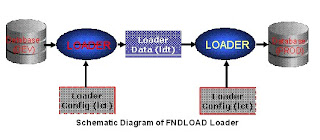
If I want to generate a ldt file I ran this command
FNDLOAD apps/aaaa@cost O Y DOWNLOAD $GL_TOP/patch/115/import/glnlsacc.lct glnlsacc.ldt GL_ACC_CALENDAR PERIOD_SET_NAME="POWER-ONE"
Before running this I have make sure that I have set the environment variable.
I have made sure the current directory is editable.
Log filename : L2165634.log
Report filename : O2165634.out
Log file and out file got generated.vi the log file in linux you will see the below template
Application Object Library: Version : 11.5.0
Copyright (c) 1979, 1999, Oracle Corporation. All rights reserved.
module:
+---------------------------------------------------------------------------+
Current system time is 20-DEC-2010 06:47:26
+---------------------------------------------------------------------------+
Downloading GL_ACC_CALENDAR to the data file glnlsacc.ldt
Downloaded GL_ACC_CALENDAR POWER-ONE
+---------------------------------------------------------------------------+
Concurrent request completed successfully
Current system time is 20-DEC-2010 06:47:26
+---------------------------------------------------------------------------+
The log says it has downloaded
See the sample ldt file
===================================================
# $Header$
#
LANGUAGE = "US"
LDRCONFIG = "glnlsacc.lct 115.1"
#Source Database COST
#RELEASE_NAME 11.5.10.2
# -- Begin Entity Definitions --
DEFINE GL_ACC_CALENDAR
KEY PERIOD_SET_NAME VARCHAR2(15)
CTX OWNER VARCHAR2(6)
BASE ATTRIBUTE1 VARCHAR2(150)
BASE ATTRIBUTE2 VARCHAR2(150)
BASE ATTRIBUTE3 VARCHAR2(150)
BASE ATTRIBUTE4 VARCHAR2(150)
BASE ATTRIBUTE5 VARCHAR2(150)
BASE CONTEXT VARCHAR2(150)
BASE DESCRIPTION VARCHAR2(240)
DEFINE GL_PERIODS
KEY PERIOD_NAME VARCHAR2(15)
CTX OWNER VARCHAR2(6)
BASE START_DATE VARCHAR2(15)
BASE END_DATE VARCHAR2(15)
BASE PERIOD_TYPE VARCHAR2(15)
BASE PERIOD_YEAR NUMBER(22)
BASE PERIOD_NUM NUMBER(22)
BASE QUARTER_NUM NUMBER(22)
BASE ENTERED_PERIOD_NAME VARCHAR2(15)
BASE ADJUSTMENT_PERIOD_FLAG VARCHAR2(1)
BASE CONTEXT VARCHAR2(150)
BASE DESCRIPTION VARCHAR2(240)
BASE ATTRIBUTE1 VARCHAR2(150)
BASE ATTRIBUTE2 VARCHAR2(150)
BASE ATTRIBUTE3 VARCHAR2(150)
BASE ATTRIBUTE4 VARCHAR2(150)
BASE ATTRIBUTE5 VARCHAR2(150)
BASE ATTRIBUTE6 VARCHAR2(150)
BASE ATTRIBUTE7 VARCHAR2(150)
BASE ATTRIBUTE8 VARCHAR2(150)
END GL_PERIODS
END GL_ACC_CALENDAR
# -- End Entity Definitions --
BEGIN GL_ACC_CALENDAR "POWER-ONE"
OWNER = "CUSTOM"
DESCRIPTION = "POWER-ONE CALENDAR"
BEGIN GL_PERIODS "NOV-96"
OWNER = "CUSTOM"
START_DATE = "1996/10/28"
END_DATE = "1996/11/24"
PERIOD_TYPE = "1"
PERIOD_YEAR = "1996"
PERIOD_NUM = "11"
QUARTER_NUM = "4"
ENTERED_PERIOD_NAME = "NOV"
ADJUSTMENT_PERIOD_FLAG = "N"
END GL_PERIODS
BEGIN GL_PERIODS "DEC-96"
OWNER = "CUSTOM"
START_DATE = "1996/11/25"
END_DATE = "1996/12/29"
PERIOD_TYPE = "1"
PERIOD_YEAR = "1996"
PERIOD_NUM = "12"
QUARTER_NUM = "4"
ENTERED_PERIOD_NAME = "DEC"
ADJUSTMENT_PERIOD_FLAG = "N"
END GL_PERIODS
BEGIN GL_PERIODS "ADJ-96"
OWNER = "CUSTOM"
START_DATE = "1996/12/29"
END_DATE = "1996/12/29"
PERIOD_TYPE = "1"
PERIOD_YEAR = "1996"
PERIOD_NUM = "13"
QUARTER_NUM = "4"
ENTERED_PERIOD_NAME = "ADJ"
ADJUSTMENT_PERIOD_FLAG = "Y"
END GL_PERIODS
BEGIN GL_PERIODS "JAN-97"
OWNER = "CUSTOM"
START_DATE = "1996/12/30"
END_DATE = "1997/01/26"
PERIOD_TYPE = "1"
PERIOD_YEAR = "1997"
PERIOD_NUM = "1"
QUARTER_NUM = "1"
ENTERED_PERIOD_NAME = "JAN"
ADJUSTMENT_PERIOD_FLAG = "N"
END GL_PERIODS
BEGIN GL_PERIODS "FEB-97"
OWNER = "CUSTOM"
START_DATE = "1997/01/27"
END_DATE = "1997/02/23"
PERIOD_TYPE = "1"
PERIOD_YEAR = "1997"
PERIOD_NUM = "2"
QUARTER_NUM = "1"
ENTERED_PERIOD_NAME = "FEB"
ADJUSTMENT_PERIOD_FLAG = "N"
END GL_PERIODS
……………………. Goes on
END GL_ACC_CALENDAR
=============================================================
we have set environmental variable first
from admin folder run fndload. run envinomental variable from appl_top path . ./*.env
While Uploading:
Uploading from the data file c:\tabular.ldt
Altering database NLS_LANGUAGE environment to AMERICAN
Dump from LCT/LDT files (d:\oracle\prodappl\fnd\11.5.0\patch\115\import\afcpprog.lct(115.39), c:\tabular.ldt) to stage tables
Dump LCT file d:\oracle\prodappl\fnd\11.5.0\patch\115\import\afcpprog.lct(115.39) into FND_SEED_STAGE_CONFIG
Dump LDT file c:\tabular.ldt into FND_SEED_STAGE_ENTITY
No data found for upload ------> /*if error this message will be shown*/
*********************************************
Enter: D:\oracle\prodappl\fnd\11.5.0\bin>fndload apps/apps@prod 0 Y UPLOAD d:\oracle\prodappl\ fnd\11.5.0\patch\115\import\afcpprog.lct c:\jb.ldt
Log filename : L2753692.log
Report filename : O2753692.out
Enter: D:\oracle\prodappl\fnd\11.5.0\bin>type L2753692.log
***************************************
Uploading from the data file c:\jb.ldt
Altering database NLS_LANGUAGE environment to AMERICAN
Dump from LCT/LDT files (d:\oracle\prodappl\fnd\11.5.0\patch\115\import\afcpprog.lct(115.39), c:\jb.ldt) to stage tables
Dump LCT file d:\oracle\prodappl\fnd\11.5.0\patch\115\import\afcpprog.lct(115.39
) into FND_SEED_STAGE_CONFIG
Dump LDT file c:\jb.ldt into FND_SEED_STAGE_ENTITY
Dumped the batch (EXECUTABLE SAMPLE1 SQLAP , PROGRAM JB_SAMPLE1_PRG SQLAP ) into
FND_SEED_STAGE_ENTITY
Upload from stage tables ------->/* if it is correct*/
+---------------------------------------------------------------------------+
Concurrent request completed successfully
Current system time is 29-MAR-2008 16:52:39
+---------------------------------------------------------------------------+
FND Objects that seeded LCT files available.
Responsibility
FND User
Value Set
Value Set with Values
Profile Option
Profile Option Setup without Values
Profile Option at Responsibility level
Message
Concurrent Program
Request Group
Request Group Unit
Request Set
Request Set Links
Forms
Forms Function
Forms Personalization
Menu
Menu: Submenu
DFF
DFF Context Code
KFF
Lookup Type
Printer
Printer Style
Printer Driver
Printer Type
Workflow
Alerts
Concurrent Queues
Audit Groups
XMLPublisher Templates
Sample Commands for few Entities
1 - Printer Styles
FNDLOAD apps/apps@seed115 O Y DOWNLOAD $FND_TOP/patch/115/import/afcppstl.lct file_name.ldt STYLE PRINTER_STYLE_NAME="printer style name"
2 - Lookups
FNDLOAD apps/apps@seed115 O Y DOWNLOAD $FND_TOP/patch/115/import/aflvmlu.lct file_name.ldt FND_LOOKUP_TYPE APPLICATION_SHORT_NAME="prod" LOOKUP_TYPE="lookup name"
3 - Descriptive Flexfield with all of specific Contexts
FNDLOAD apps/apps@seed115 O Y DOWNLOAD $FND_TOP/patch/115/import/afffload.lct file_name.ldt DESC_FLEX P_LEVEL=?COL_ALL:REF_ALL:CTX_ONE:SEG_ALL? APPLICATION_SHORT_NAME="prod" DESCRIPTIVE_FLEXFIELD_NAME="desc flex name" P_CONTEXT_CODE="context name"
4 - Key Flexfield Structures
FNDLOAD apps/apps@seed115 O Y DOWNLOAD $FND_TOP/patch/115/import/afffload.lct file_name.ldt KEY_FLEX P_LEVEL=?COL_ALL:FQL_ALL:SQL_ALL:STR_ONE:WFP_ALL:SHA_ALL:CVR_ALL:SEG_ALL? APPLICATION_SHORT_NAME="prod" ID_FLEX_CODE="key flex code" P_STRUCTURE_CODE="structure name"
5 - Concurrent Programs
FNDLOAD apps/apps@seed115 O Y DOWNLOAD $FND_TOP/patch/115/import/afcpprog.lct file_name.ldt PROGRAM APPLICATION_SHORT_NAME="prod" CONCURRENT_PROGRAM_NAME="concurrent name"
6 - Value Sets
FNDLOAD apps/apps@seed115 O Y DOWNLOAD $FND_TOP/patch/115/import/afffload.lct file_name.ldt VALUE_SET FLEX_VALUE_SET_NAME="value set name"
7 - Value Sets with values
FNDLOAD apps/apps@seed115 O Y DOWNLOAD $FND_TOP/patch/115/import/afffload.lct file_name.ldt VALUE_SET_VALUE FLEX_VALUE_SET_NAME="value set name"
8 - Profile Options
FNDLOAD apps/apps@seed115 O Y DOWNLOAD $FND_TOP/patch/115/import/afscprof.lct file_name.ldt PROFILE PROFILE_NAME="profile option" APPLICATION_SHORT_NAME="prod"
9 - Requset Group
FNDLOAD apps/apps@seed115 O Y DOWNLOAD $FND_TOP/patch/115/import/afcpreqg.lct file_name.ldt REQUEST_GROUP REQUEST_GROUP_NAME="request group" APPLICATION_SHORT_NAME="prod"
10 - Request Sets
FNDLOAD apps/apps@seed115 O Y DOWNLOAD $FND_TOP/patch/115/import/afcprset.lct file_name.ldt REQ_SET APPLICATION_SHORT_NAME="prod" REQUEST_SET_NAME="request set"
11 - Responsibilities
FNDLOAD apps/apps@seed115 O Y DOWNLOAD $FND_TOP/patch/115/import/afscursp.lct file_name.ldt FND_RESPONSIBILITY RESP_KEY="responsibility
12 - Menus
FNDLOAD apps/apps@seed115 O Y DOWNLOAD $FND_TOP/patch/115/import/afsload.lct file_name.ldt MENU MENU_NAME="menu_name"
13 – Forms/Functions
FNDLOAD apps/apps@seed115 0 Y DOWNLOAD $FND_TOP/patch/115/import/affrmcus.lct file_name.ldt FND_FORM_CUSTOM_RULES The Upload syntax for all styles: FNDLOAD apps/apps@seed115 0 Y UPLOAD $FND_TOP/patch/115/import/affrmcus.lct file_name.ldt
14. User/Responsibilities
FNDLOAD apps/apps@seed115 0 Y DOWNLOAD @FND:patch/115/import/afscursp.lct file_name.ldt FND_USER Then UPLOAD FNDLOAD apps/apps@seed115 0 Y UPLOAD [UPLOAD_PARTIAL] @FND:patch/115/import/afscursp.lct file_name.ldt FND_USER [USER]
References:
• Oracle Applications Systems Administrator’s Guide
• Metalink Notes: 117084.1, 228614.1 232029.1 , 274667.1
Modification of Seeded LCT files are not recommended.
We can built our own LCT files for any setups.
This is a utility provided by oracle which is useful for migration of an entity from one instance to another instance.
An entity I mean here is a setup for example defining a concurrent program is a setup, defing a buyers is a setup.
This utility will help us when we need a particular setup needs to be moved from an instance to instance. As we know we will have multiple instances in our work environment to work on like PROD, TEST, DEV, and CRP...Etc.Imagine if I need to create a gl code combinations setup from my CRP instance to TEST instance.How much man hours I need for this.FNDLOAD will help here to move this setup from instance to instance in just 5 mins with help of 2 commands.
How FNDLOAD works is we have lct files for each entity and use a particular lct file for the setup.
A brief explanation about the LCT file:
Here I will take a GL Accounting Calendar setup for an example.
# FILENAME
# glnlsacc.lct
# PURPOSE
# GL Accounting Calendar Loader Configuration
# ENTITY
# GL_ACC_CALENDAR
If I need to move period set name LCT will automatically take care of the dependencies like periods.
In the same way if we are trying to load the concurrent program to another instances.LCT will take care of its dependencies like Exectables, valuesets, incompatabilies, parameters...etc
Firstly we will find the define section where all the attributes will be defined here.
Attributes here are our database columns.
Here Period set name is our parent entity and under it there is a child entity period name.
# -- DEFINE SECTION --
#
# Use this section to specify the structure of the entities.
#
# ID column values are not portable. Use an equivalent text value instead.
# For example, use APPLICATION_SHORT_NAME instead of APPLICATION_ID.
#
# DATE and NUMBER datatypes should be defined and stored as VARCHAR2(11)
# and VARCHAR2(50), respectively.
#
# The OWNER field is used to store and determine the values of the
# "WHO" columns.
# /* $Header: glnlsacc.lct 115.1 2002/10/21 05:59:36 nkasu noship $ */
DEFINE GL_ACC_CALENDAR
KEY PERIOD_SET_NAME VARCHAR2(15)
CTX OWNER VARCHAR2(6)
BASE ATTRIBUTE1 VARCHAR2(150)
BASE ATTRIBUTE2 VARCHAR2(150)
BASE ATTRIBUTE3 VARCHAR2(150)
BASE ATTRIBUTE4 VARCHAR2(150)
BASE ATTRIBUTE5 VARCHAR2(150)
BASE CONTEXT VARCHAR2(150)
BASE DESCRIPTION VARCHAR2(240)
DEFINE GL_PERIODS
KEY PERIOD_NAME VARCHAR2(15)
CTX OWNER VARCHAR2(6)
BASE START_DATE VARCHAR2(15)
BASE END_DATE VARCHAR2(15)
BASE PERIOD_TYPE VARCHAR2(15)
BASE PERIOD_YEAR NUMBER
BASE PERIOD_NUM NUMBER
BASE QUARTER_NUM NUMBER
BASE ENTERED_PERIOD_NAME VARCHAR2(15)
BASE ADJUSTMENT_PERIOD_FLAG VARCHAR2(1)
BASE CONTEXT VARCHAR2(150)
BASE DESCRIPTION VARCHAR2(240)
BASE ATTRIBUTE1 VARCHAR2(150)
BASE ATTRIBUTE2 VARCHAR2(150)
BASE ATTRIBUTE3 VARCHAR2(150)
BASE ATTRIBUTE4 VARCHAR2(150)
BASE ATTRIBUTE5 VARCHAR2(150)
BASE ATTRIBUTE6 VARCHAR2(150)
BASE ATTRIBUTE7 VARCHAR2(150)
BASE ATTRIBUTE8 VARCHAR2(150)
END GL_PERIODS
END GL_ACC_CALENDAR
Here starts our Download section
Its just a sql statements.Here all our key attributes can be used as parameters and its optional is you are not passing it will run for all the data.
# -- DOWNLOAD SECTION --
#
# For each entity, specify the SQL statement to use to flesh out
# its entity definition. SELECT columns must be in same order and
# datatype as the entity's attributes as defined above.
#
# Convert dates to varchar2 using:
# to_char(sysdate, 'DD/MM/YYYY')
#
# Wrap parameter values with nvl() to support null parameter passing
#
DOWNLOAD GL_ACC_CALENDAR
"select period_set_name,
decode(LAST_UPDATED_BY, 1, 'SEED', 'CUSTOM') OWNER,
ATTRIBUTE1,
ATTRIBUTE2,
ATTRIBUTE3,
ATTRIBUTE4,
ATTRIBUTE5,
CONTEXT,
DESCRIPTION
from GL_PERIOD_SETS
where period_set_name like nvl( :PERIOD_SET_NAME, '%')"
DOWNLOAD GL_PERIODS
"select period_name,
decode(LAST_UPDATED_BY, 1, 'SEED', 'CUSTOM') OWNER,
to_char(start_date,'YYYY/MM/DD'),
to_char(end_date,'YYYY/MM/DD'),
period_type,
period_year,
period_num,
quarter_num,
entered_period_name,
adjustment_period_flag,
context,
description,
attribute1,
attribute2,
attribute3,
attribute4,
attribute5,
attribute6,
attribute7,
attribute8
from gl_periods_v
where period_set_name like nvl( :PERIOD_SET_NAME, '%')"
UPLOAD section
Mostly oracle uses API for inserting.
# -- UPLOAD section --
#
# For each entity, specify the pl/sql block to use to upload the
# entity into the database. Bind names must match DEFINE attribute names.
# If the relevant tables have table handlers defined, use the LOAD_ROW
# procedure.
#
# Non-leaf entities must include the BEGIN keyword.
#
# Child entities may use bind names from their parents' definitions.
# Use command line parameters to control branching between desired behavior.
# For example, in the upload statement below, we use the parameter
# UPLOAD_MODE to specify whether we are doing a regular upload or a
# special upload of translated columns.
#
UPLOAD GL_ACC_CALENDAR
BEGIN
" begin
gl_period_sets_pkg.Load_Row(
X_Period_Set_Name => :period_set_name,
X_Owner => :owner,
X_Description => :description,
X_Context => :context,
X_Attribute1 => :attribute1,
X_Attribute2 => :attribute2,
X_Attribute3 => :attribute3,
X_Attribute4 => :attribute4,
X_Attribute5 => :attribute5);
end; "
UPLOAD GL_PERIODS
" begin
gl_periods_pkg.Load_Row(
X_Period_Set_Name => :period_set_name,
X_Period_Name => :period_name,
X_Owner => :owner,
X_Start_Date => :start_date,
X_End_Date => :end_date,
X_Period_Type => :period_type,
X_Period_Year => :period_year,
X_Period_Num => :period_num,
X_Quarter_Num => :quarter_num,
X_Entered_Period_Name => :entered_period_name,
X_Description => :description,
X_Attribute1 => :attribute1,
X_Attribute2 => :attribute2,
X_Attribute3 => :attribute3,
X_Attribute4 => :attribute4,
X_Attribute5 => :attribute5,
X_Attribute6 => :attribute6,
X_Attribute7 => :attribute7,
X_Attribute8 => :attribute8,
X_Context => :context,
X_Adjustment_Period_Flag => :adjustment_period_flag );
end;"
By This we have complted a glance on how lct file built.
How to use this
FNDLOAD apps/pwd 0 Y mode configfile datafile entity
[ param ... ]
Where
apps/pwd The APPS schema and password in the form If
connect_string is omitted, it is taken in a
platform–specific manner from the environment
using the name TWO_TASK.
0 Y Concurrent program flags
mode UPLOAD or DOWNLOAD. UPLOAD causes the
Data file to be uploaded to the database.
DOWNLOAD causes the loader to fetch rows and
write them to the data file.
Configfile The configuration file to use (usually with a suffix
of .lct, but not enforced or supplied by the loader).
datafile The data file to write (usually with a suffix of .ldt,
but not enforced or supplied by the loader). If the
data file already exists, it will be overwritten.
entity The entity(ies) to upload or download. When uploading, you should always upload all entities, so specify a ”–” to upload all entities.
[param] Zero or more additional parameters are used to provide bind values in the access SQL (both UPLOAD and DOWNLOAD). Each parameter is in the form NAME=VALUE. NAME should not conflict with an attribute name for the entities being loaded.
File Specifications
The configuration file and data file parameters are specified in one of
two ways:
@application_short_name>:[dir/.../]file.ext
For example,
@fnd/11i/loader/fndapp.lct
@po:install/data/poreq.ldt
Alternatively, the parameters can be specified as such:
native path
mydata.ldt
c:\loader\config\cfg102.lct
If we run FNDLAOD with DOWNLOAD parameter it will expect the file name in which it has extract the data from database and write.That we generally call as ldt file.
It is in a editable format
IF you run FNDLOAD with UPLOAD and ldt file name as parameters it will use API’s and any insert options to insert into data from ldt file to DB.

If I want to generate a ldt file I ran this command
FNDLOAD apps/aaaa@cost O Y DOWNLOAD $GL_TOP/patch/115/import/glnlsacc.lct glnlsacc.ldt GL_ACC_CALENDAR PERIOD_SET_NAME="POWER-ONE"
Before running this I have make sure that I have set the environment variable.
I have made sure the current directory is editable.
Log filename : L2165634.log
Report filename : O2165634.out
Log file and out file got generated.vi the log file in linux you will see the below template
Application Object Library: Version : 11.5.0
Copyright (c) 1979, 1999, Oracle Corporation. All rights reserved.
module:
+---------------------------------------------------------------------------+
Current system time is 20-DEC-2010 06:47:26
+---------------------------------------------------------------------------+
Downloading GL_ACC_CALENDAR to the data file glnlsacc.ldt
Downloaded GL_ACC_CALENDAR POWER-ONE
+---------------------------------------------------------------------------+
Concurrent request completed successfully
Current system time is 20-DEC-2010 06:47:26
+---------------------------------------------------------------------------+
The log says it has downloaded
See the sample ldt file
===================================================
# $Header$
#
LANGUAGE = "US"
LDRCONFIG = "glnlsacc.lct 115.1"
#Source Database COST
#RELEASE_NAME 11.5.10.2
# -- Begin Entity Definitions --
DEFINE GL_ACC_CALENDAR
KEY PERIOD_SET_NAME VARCHAR2(15)
CTX OWNER VARCHAR2(6)
BASE ATTRIBUTE1 VARCHAR2(150)
BASE ATTRIBUTE2 VARCHAR2(150)
BASE ATTRIBUTE3 VARCHAR2(150)
BASE ATTRIBUTE4 VARCHAR2(150)
BASE ATTRIBUTE5 VARCHAR2(150)
BASE CONTEXT VARCHAR2(150)
BASE DESCRIPTION VARCHAR2(240)
DEFINE GL_PERIODS
KEY PERIOD_NAME VARCHAR2(15)
CTX OWNER VARCHAR2(6)
BASE START_DATE VARCHAR2(15)
BASE END_DATE VARCHAR2(15)
BASE PERIOD_TYPE VARCHAR2(15)
BASE PERIOD_YEAR NUMBER(22)
BASE PERIOD_NUM NUMBER(22)
BASE QUARTER_NUM NUMBER(22)
BASE ENTERED_PERIOD_NAME VARCHAR2(15)
BASE ADJUSTMENT_PERIOD_FLAG VARCHAR2(1)
BASE CONTEXT VARCHAR2(150)
BASE DESCRIPTION VARCHAR2(240)
BASE ATTRIBUTE1 VARCHAR2(150)
BASE ATTRIBUTE2 VARCHAR2(150)
BASE ATTRIBUTE3 VARCHAR2(150)
BASE ATTRIBUTE4 VARCHAR2(150)
BASE ATTRIBUTE5 VARCHAR2(150)
BASE ATTRIBUTE6 VARCHAR2(150)
BASE ATTRIBUTE7 VARCHAR2(150)
BASE ATTRIBUTE8 VARCHAR2(150)
END GL_PERIODS
END GL_ACC_CALENDAR
# -- End Entity Definitions --
BEGIN GL_ACC_CALENDAR "POWER-ONE"
OWNER = "CUSTOM"
DESCRIPTION = "POWER-ONE CALENDAR"
BEGIN GL_PERIODS "NOV-96"
OWNER = "CUSTOM"
START_DATE = "1996/10/28"
END_DATE = "1996/11/24"
PERIOD_TYPE = "1"
PERIOD_YEAR = "1996"
PERIOD_NUM = "11"
QUARTER_NUM = "4"
ENTERED_PERIOD_NAME = "NOV"
ADJUSTMENT_PERIOD_FLAG = "N"
END GL_PERIODS
BEGIN GL_PERIODS "DEC-96"
OWNER = "CUSTOM"
START_DATE = "1996/11/25"
END_DATE = "1996/12/29"
PERIOD_TYPE = "1"
PERIOD_YEAR = "1996"
PERIOD_NUM = "12"
QUARTER_NUM = "4"
ENTERED_PERIOD_NAME = "DEC"
ADJUSTMENT_PERIOD_FLAG = "N"
END GL_PERIODS
BEGIN GL_PERIODS "ADJ-96"
OWNER = "CUSTOM"
START_DATE = "1996/12/29"
END_DATE = "1996/12/29"
PERIOD_TYPE = "1"
PERIOD_YEAR = "1996"
PERIOD_NUM = "13"
QUARTER_NUM = "4"
ENTERED_PERIOD_NAME = "ADJ"
ADJUSTMENT_PERIOD_FLAG = "Y"
END GL_PERIODS
BEGIN GL_PERIODS "JAN-97"
OWNER = "CUSTOM"
START_DATE = "1996/12/30"
END_DATE = "1997/01/26"
PERIOD_TYPE = "1"
PERIOD_YEAR = "1997"
PERIOD_NUM = "1"
QUARTER_NUM = "1"
ENTERED_PERIOD_NAME = "JAN"
ADJUSTMENT_PERIOD_FLAG = "N"
END GL_PERIODS
BEGIN GL_PERIODS "FEB-97"
OWNER = "CUSTOM"
START_DATE = "1997/01/27"
END_DATE = "1997/02/23"
PERIOD_TYPE = "1"
PERIOD_YEAR = "1997"
PERIOD_NUM = "2"
QUARTER_NUM = "1"
ENTERED_PERIOD_NAME = "FEB"
ADJUSTMENT_PERIOD_FLAG = "N"
END GL_PERIODS
……………………. Goes on
END GL_ACC_CALENDAR
=============================================================
we have set environmental variable first
from admin folder run fndload. run envinomental variable from appl_top path . ./*.env
While Uploading:
Uploading from the data file c:\tabular.ldt
Altering database NLS_LANGUAGE environment to AMERICAN
Dump from LCT/LDT files (d:\oracle\prodappl\fnd\11.5.0\patch\115\import\afcpprog.lct(115.39), c:\tabular.ldt) to stage tables
Dump LCT file d:\oracle\prodappl\fnd\11.5.0\patch\115\import\afcpprog.lct(115.39) into FND_SEED_STAGE_CONFIG
Dump LDT file c:\tabular.ldt into FND_SEED_STAGE_ENTITY
No data found for upload ------> /*if error this message will be shown*/
*********************************************
Enter: D:\oracle\prodappl\fnd\11.5.0\bin>fndload apps/apps@prod 0 Y UPLOAD d:\oracle\prodappl\ fnd\11.5.0\patch\115\import\afcpprog.lct c:\jb.ldt
Log filename : L2753692.log
Report filename : O2753692.out
Enter: D:\oracle\prodappl\fnd\11.5.0\bin>type L2753692.log
***************************************
Uploading from the data file c:\jb.ldt
Altering database NLS_LANGUAGE environment to AMERICAN
Dump from LCT/LDT files (d:\oracle\prodappl\fnd\11.5.0\patch\115\import\afcpprog.lct(115.39), c:\jb.ldt) to stage tables
Dump LCT file d:\oracle\prodappl\fnd\11.5.0\patch\115\import\afcpprog.lct(115.39
) into FND_SEED_STAGE_CONFIG
Dump LDT file c:\jb.ldt into FND_SEED_STAGE_ENTITY
Dumped the batch (EXECUTABLE SAMPLE1 SQLAP , PROGRAM JB_SAMPLE1_PRG SQLAP ) into
FND_SEED_STAGE_ENTITY
Upload from stage tables ------->/* if it is correct*/
+---------------------------------------------------------------------------+
Concurrent request completed successfully
Current system time is 29-MAR-2008 16:52:39
+---------------------------------------------------------------------------+
FND Objects that seeded LCT files available.
Responsibility
FND User
Value Set
Value Set with Values
Profile Option
Profile Option Setup without Values
Profile Option at Responsibility level
Message
Concurrent Program
Request Group
Request Group Unit
Request Set
Request Set Links
Forms
Forms Function
Forms Personalization
Menu
Menu: Submenu
DFF
DFF Context Code
KFF
Lookup Type
Printer
Printer Style
Printer Driver
Printer Type
Workflow
Alerts
Concurrent Queues
Audit Groups
XMLPublisher Templates
Sample Commands for few Entities
1 - Printer Styles
FNDLOAD apps/apps@seed115 O Y DOWNLOAD $FND_TOP/patch/115/import/afcppstl.lct file_name.ldt STYLE PRINTER_STYLE_NAME="printer style name"
2 - Lookups
FNDLOAD apps/apps@seed115 O Y DOWNLOAD $FND_TOP/patch/115/import/aflvmlu.lct file_name.ldt FND_LOOKUP_TYPE APPLICATION_SHORT_NAME="prod" LOOKUP_TYPE="lookup name"
3 - Descriptive Flexfield with all of specific Contexts
FNDLOAD apps/apps@seed115 O Y DOWNLOAD $FND_TOP/patch/115/import/afffload.lct file_name.ldt DESC_FLEX P_LEVEL=?COL_ALL:REF_ALL:CTX_ONE:SEG_ALL? APPLICATION_SHORT_NAME="prod" DESCRIPTIVE_FLEXFIELD_NAME="desc flex name" P_CONTEXT_CODE="context name"
4 - Key Flexfield Structures
FNDLOAD apps/apps@seed115 O Y DOWNLOAD $FND_TOP/patch/115/import/afffload.lct file_name.ldt KEY_FLEX P_LEVEL=?COL_ALL:FQL_ALL:SQL_ALL:STR_ONE:WFP_ALL:SHA_ALL:CVR_ALL:SEG_ALL? APPLICATION_SHORT_NAME="prod" ID_FLEX_CODE="key flex code" P_STRUCTURE_CODE="structure name"
5 - Concurrent Programs
FNDLOAD apps/apps@seed115 O Y DOWNLOAD $FND_TOP/patch/115/import/afcpprog.lct file_name.ldt PROGRAM APPLICATION_SHORT_NAME="prod" CONCURRENT_PROGRAM_NAME="concurrent name"
6 - Value Sets
FNDLOAD apps/apps@seed115 O Y DOWNLOAD $FND_TOP/patch/115/import/afffload.lct file_name.ldt VALUE_SET FLEX_VALUE_SET_NAME="value set name"
7 - Value Sets with values
FNDLOAD apps/apps@seed115 O Y DOWNLOAD $FND_TOP/patch/115/import/afffload.lct file_name.ldt VALUE_SET_VALUE FLEX_VALUE_SET_NAME="value set name"
8 - Profile Options
FNDLOAD apps/apps@seed115 O Y DOWNLOAD $FND_TOP/patch/115/import/afscprof.lct file_name.ldt PROFILE PROFILE_NAME="profile option" APPLICATION_SHORT_NAME="prod"
9 - Requset Group
FNDLOAD apps/apps@seed115 O Y DOWNLOAD $FND_TOP/patch/115/import/afcpreqg.lct file_name.ldt REQUEST_GROUP REQUEST_GROUP_NAME="request group" APPLICATION_SHORT_NAME="prod"
10 - Request Sets
FNDLOAD apps/apps@seed115 O Y DOWNLOAD $FND_TOP/patch/115/import/afcprset.lct file_name.ldt REQ_SET APPLICATION_SHORT_NAME="prod" REQUEST_SET_NAME="request set"
11 - Responsibilities
FNDLOAD apps/apps@seed115 O Y DOWNLOAD $FND_TOP/patch/115/import/afscursp.lct file_name.ldt FND_RESPONSIBILITY RESP_KEY="responsibility
12 - Menus
FNDLOAD apps/apps@seed115 O Y DOWNLOAD $FND_TOP/patch/115/import/afsload.lct file_name.ldt MENU MENU_NAME="menu_name"
13 – Forms/Functions
FNDLOAD apps/apps@seed115 0 Y DOWNLOAD $FND_TOP/patch/115/import/affrmcus.lct file_name.ldt FND_FORM_CUSTOM_RULES The Upload syntax for all styles: FNDLOAD apps/apps@seed115 0 Y UPLOAD $FND_TOP/patch/115/import/affrmcus.lct file_name.ldt
14. User/Responsibilities
FNDLOAD apps/apps@seed115 0 Y DOWNLOAD @FND:patch/115/import/afscursp.lct file_name.ldt FND_USER Then UPLOAD FNDLOAD apps/apps@seed115 0 Y UPLOAD [UPLOAD_PARTIAL] @FND:patch/115/import/afscursp.lct file_name.ldt FND_USER [USER]
References:
• Oracle Applications Systems Administrator’s Guide
• Metalink Notes: 117084.1, 228614.1 232029.1 , 274667.1
Modification of Seeded LCT files are not recommended.
We can built our own LCT files for any setups.
PROFILES Query
|
|
|
0
comments
SELECT SUBSTR(e.profile_option_name,1,25) PROFILE ,
SUBSTR(e.profile_option_name,1,25) USER_PROFILE_NAME ,
DECODE(a.level_id,10001,'Site',10002,'Application',10003,'Resp',10004,'User') L ,
DECODE(a.level_id,10001,'Site',10002,c.application_short_name,10003,b.responsibility_name,10004,d.user_name) LValue,
NVL(a.profile_option_value,'Is Null') Value ,
SUBSTR(a.last_update_date,1,25) UPDATED_DATE
FROM fnd_profile_option_values a,
fnd_responsibility_tl b ,
fnd_application c ,
fnd_user d ,
fnd_profile_options_vl e
WHERE e.user_profile_option_name IN ('MO: Operating Unit')
AND e.profile_option_id = a.profile_option_id
AND a.level_value = b.responsibility_id (+)
AND a.level_value = c.application_id (+)
AND a.level_value = d.user_id (+)
ORDER BY profile_option_name;
SUBSTR(e.profile_option_name,1,25) USER_PROFILE_NAME ,
DECODE(a.level_id,10001,'Site',10002,'Application',10003,'Resp',10004,'User') L ,
DECODE(a.level_id,10001,'Site',10002,c.application_short_name,10003,b.responsibility_name,10004,d.user_name) LValue,
NVL(a.profile_option_value,'Is Null') Value ,
SUBSTR(a.last_update_date,1,25) UPDATED_DATE
FROM fnd_profile_option_values a,
fnd_responsibility_tl b ,
fnd_application c ,
fnd_user d ,
fnd_profile_options_vl e
WHERE e.user_profile_option_name IN ('MO: Operating Unit')
AND e.profile_option_id = a.profile_option_id
AND a.level_value = b.responsibility_id (+)
AND a.level_value = c.application_id (+)
AND a.level_value = d.user_id (+)
ORDER BY profile_option_name;
Basic Java Concepts Required for ADF Newbie’s who are migrating from ORACLE APPS background(like me).
Wednesday, November 10, 2010
| | | 0 comments
OOPs and Its Concepts in Java
Objects represent some concepts or things and like any other objects in the real Objects in programming language have certain behavior, properties, type, and identity. In OOP based language the principal aim is to find out the objects to manipulate and their relation between each other. OOP offers greater flexibility and compatibility and is popular in developing larger application.
Java is a object oriented programming and to understand the functionality of OOP in Java, we first need to understand several fundamentals related to objects. These include class, method, inheritance, encapsulation, abstraction, polymorphism etc.
Class - It is the central point of OOP. In Java everything happens within class and it describes a set of objects with common behavior. The class definition describes all the properties, behavior, and identity of objects present within that class. A class is the blueprint from which individual objects are created.
In the real world, you'll often find many individual objects all of the same kind. There may be thousands of other bicycles in existence, all of the same make and model. Each bicycle was built from the same set of blueprints and therefore contains the same components
The following Bicycle class is one possible implementation of a bicycle:
class Bicycle {
-- Variable declartions
int cadence = 0;
int speed = 0;
int gear = 1;
-- Below are the methods like our procedure/functions in plsql
void changeCadence(int newValue) {
cadence = newValue;
}
void changeGear(int newValue) {
gear = newValue;
}
void speedUp(int increment) {
speed = speed + increment;
}
void applyBrakes(int decrement) {
speed = speed - decrement;
}
void printStates() {
System.out.println("cadence:"+cadence+" speed:"+speed+" gear:"+gear);
}
}
/* public static int is a function returning int.
public static void is a procedure */
OBJECTS - Objects are key to understanding object-oriented technology. Look around right now and you'll find many examples of real-world objects: your dog, your bicycle.
Real-world objects share two characteristics: They all have state and behavior. Dogs have state (name, color, breed, hungry) and behavior (barking, fetching, wagging tail). Bicycles also have state (current gear, current pedal cadence, current speed) and behavior (changing gear, changing pedal cadence, applying brakes). Identifying the state and behavior for real-world objects is a great way to begin thinking in terms of object-oriented programming.
class BicycleDemo {
public static void main(String[] args) {
// Create two different Bicycle objects
-- This is the syntax to create a object for any class.
Bicycle bike1 = new Bicycle();
Bicycle bike2 = new Bicycle();
// Invoke methods on those objects.we can acees all the methods and variables in the class using the object.
bike1.changeCadence(50);
bike1.speedUp(10);
bike1.changeGear(2);
bike1.printStates();
bike2.changeCadence(50);
bike2.speedUp(10);
bike2.changeGear(2);
bike2.changeCadence(40);
bike2.speedUp(10);
bike2.changeGear(3);
bike2.printStates();
}
}
Methods - We know that a class can define both attributes and behaviors. Again attributes are defined by variables and behaviors are represented by methods. In other words, methods define the abilities of an object.
Inheritance - In object oriented programming classes can inherit some common behavior and state from others. Object-oriented programming allows classes to inherit commonly used state and behavior from other classes. In this example, Bicycle now becomes the superclass of MountainBike, RoadBike, and TandemBike. In the Java programming language, each class is allowed to have one direct superclass, and each superclass has the potential for an unlimited number of subclasses:
Bicycle
/ | \
/ Road \
Mount Bike \
Bike \
tandem Bike
Mountain bikes, road bikes, and tandem bikes, for example, all share the characteristics of bicycles (current speed, current pedal cadence, current gear). Yet each also defines additional features that make them different: tandem bicycles have two seats and two sets of handlebars; road bikes have drop handlebars; some mountain bikes have an additional chain ring, giving them a lower gear ratio.
class MountainBike extends Bicycle {
// new fields and methods defining a mountain bike would go here
// the MountainBike subclass adds one field
public int seatHeight;
/* the MountainBike subclass has one constructor.Constructors are similar to methods, but with some important differences.
• Constructor name is class name. A constructors must have the same name as the class its in.
• Default constructor. If you don't define a constructor for a class, a default parameterless constructor is automatically created by the compiler. The default constructor calls the default parent constructor (super()) and initializes all instance variables to default value (zero for numeric types, null for object references, and false for booleans).
public MountainBike(int startHeight, int startCadence, int startSpeed, int startGear) {
super(startCadence, startSpeed, startGear);
seatHeight = startHeight;
}
// the MountainBike subclass adds one method
public void setHeight(int newValue) {
seatHeight = newValue;
}
}
Extends is the key word for inheriting a class.
This gives Mountain Bike all the same fields and methods as Bicycle, yet allows its code to focus exclusively on the features that make it unique.
Abstraction - The process of abstraction in Java is used to hide certain details and only show the essential features of the object. In other words, it deals with the outside view of an object (interface).
Abstraction in Java allows the user to hide non-essential details relevant to user.
To explain you this with an example.i will do that with acess specifiers.
Encapsulation :Encapsulation is the technique of making the fields in a class private and providing access to the fields via public methods. If a field is declared private, it cannot be accessed by anyone outside the class, thereby hiding the fields within the class. For this reason, encapsulation is also referred to as data hiding.
Encapsulation can be described as a protective barrier that prevents the code and data being randomly accessed by other code defined outside the class. Access to the data and code is tightly controlled by an interface.
Below is a table showing the effects of access specifiers for class members. “Y” means yes. Blank means No.
Specifier class subclass package world
private Y
protected Y Y Y
public Y Y Y Y
(none) Y Y
/* File name : EncapTest.java */
public class EncapTest{
private String name;
private String idNum;
private int age;
public int getAge(){
return age;
}
}
Here in the above example Variables/attributes are not accessible but methods are.
Polymorphism – Polymorphism is the ability of an object to take on many forms.I can have a same method name for many bt changing the calling parameters.
Here is example
class hai
{
public void saysomething(int newValue) {
s.o.p(‘Hai’);//s.o.p-> system.out.println
}
}
class hai
{
public void saysomething (int newValue,int oldValue) {
s.o.p(‘Bye’);;
}
}
I have same method name in the class.
This Is End of OOPS Concepts.
collection concepts: We definitely need this for ADF.
As the name indicates, collections is a group of objects known as its elements. Basically it is a package of data structures that includes ArrayLists, LinkedLists, HashSets, etc. A collection is simply an object that groups multiple elements into a single unit. It is also called as a container sometimes. It is used to store, retrieve, manipulate, and communicate aggregate data. Typically, it represents data items that form a natural group and allows duplicate elements while others do not. It consists of both ordered and unordered elements.
ArrayLists example:
/*
Java ArrayList example.
This Java ArrayList example describes the basic operations performed on the ArrayList.
*/
import java.util.ArrayList;
import java.util.Iterator;
public class ArrayListExample{
public static void main(String args[]){
// constructs a new empty ArrayList
ArrayList arrayList = new ArrayList();
/*
To specify initial capacity, use following constructor.
ArrayList ArrayList = new ArrayList(100);
To create ArrayList from Collection use following constructor
ArrayList ArrayList = new ArrayList(Collection collection);
In this case the initial capacity would be 110% of the size of the collection.
*/
/*
To add value into ArrayList use add() method.
Signature of the add() method is,
boolean add(Object object)
The value would be appended to the list.
To insert value into ArrayList at particular index, use
void add(int index, Object object)
This method will shifts the subsequent elements of the list.
To append all elements of the collection to existing list, use
boolean addAll(Collection c)
To insert all elements of the collection into existing list, use
boolean addAll(int index, Collection collection)
To replace particular element in the ArrayList, use
Object set(int index, Object value)
It returns the previous element present at the specified index.
*/
arrayList.add(new Integer(1)); //adding value to ArrayList
arrayList.add(new Integer(2));
arrayList.add(new Integer(3));
/*
IMPORTANT : We CAN NOT add primitives to the ArrayList. We have to wrap it
into one of the wrapper classes before adding.
*/
//get number of keys present in the ArrayList
System.out.println("ArrayList contains " + arrayList.size() + " elements.");
/*
To check whether ArrayList is empty or not, use isEmpty() method.
isEmpty() returns true is ArrayList is empty, otherwise false.
Finding particular value from the ArrayList:
ArrayList's contains() method returns boolean depending upon the
presence of the value in given ArrayList.
Signature of the containsValue method is,
boolean contains(Object value)
*/
if( arrayList.contains( new Integer(1) ) ){
System.out.println("ArrayList contains 1 as value");
}else{
System.out.println("ArrayList does not contain 1 as value");
}
/*
Use get method of ArrayList to get value.
Signature of the get method is,
Object get(int index)
*/
Integer one = (Integer) arrayList.get(0);
System.out.println("Value at 0 index is " + one);
/*
IMPORTANT: get method returns Object, so we need to downcast it.
*/
/*
To search element within the ArrayList, use
int indexOf(Object element)
it returns the index of first occurrence of the specified element.
To find last occurrence of the specified element, use
int lastIndexOf(Object element)
*/
System.out.println("Index of first occurrence of 1 is " + arrayList.indexOf(new Integer(1)));
/*
To convert ArrayList to object array, use
Object[] toArray() method.
This method returns an Object array containing all elements of the ArrayList
in the correct order.
*/
System.out.println("Converting ArrayList to Object array");
Object[] elements = arrayList.toArray();
for(int i=0; i < elements.length ; i++) System.out.println(elements[i]); /* To remove particular element from the ArrayList use, Object remove(int index) It returns the element that was removed from the list. To remove multiple elements from the ArrayList use, void removeRange(int fromIndex, int toIndex). It removes elements from the list whose index is between startIndex (inclusive) and toIndex(Exclusive). To remove all elements of the ArrayList use, void clear(). It removes all elements of the ArrayList. */ System.out.println("Is 1 removed from the ArrayList ? " + arrayList.remove(new Integer(1))); } } /* OUTPUT of the above given Java ArrayList Example would be: ArrayList contains 3 key value pair. ArrayList contains 1 as value Value at 0 index is 1 Index of first occurrence of 1 is 0 Converting ArrayList to Object array 1 2 3 Is 1 removed from the ArrayList ? true */ LinkedList Example: import java.util.*; public class LinkedListExample{ public static void main(String[] args) { System.out.println("Linked List Example!"); LinkedListlist = new LinkedList();
int num1 = 11, num2 = 22, num3 = 33, num4 = 44;
int size;
Iterator iterator;
//Adding data in the list
list.add(num1);
list.add(num2);
list.add(num3);
list.add(num4);
size = list.size();
System.out.print( "Linked list data: ");
//Create a iterator
iterator = list.iterator();
while (iterator.hasNext()){
System.out.print(iterator.next()+" ");
}
System.out.println();
//Check list empty or not
if (list.isEmpty()){
System.out.println("Linked list is empty");
}
else{
System.out.println( "Linked list size: " + size);
}
System.out.println("Adding data at 1st location: 55");
//Adding first
list.addFirst(55);
System.out.print("Now the list contain: ");
iterator = list.iterator();
while (iterator.hasNext()){
System.out.print(iterator.next()+" ");
}
System.out.println();
System.out.println("Now the size of list: " + list.size());
System.out.println("Adding data at last location: 66");
//Adding last or append
list.addLast(66);
System.out.print("Now the list contain: ");
iterator = list.iterator();
while (iterator.hasNext()){
System.out.print(iterator.next()+" ");
}
System.out.println();
System.out.println("Now the size of list: " + list.size());
System.out.println("Adding data at 3rd location: 55");
//Adding data at 3rd position
list.add(2,99);
System.out.print("Now the list contain: ");
iterator = list.iterator();
while (iterator.hasNext()){
System.out.print(iterator.next()+" ");
}
System.out.println();
System.out.println("Now the size of list: " + list.size());
//Retrieve first data
System.out.println("First data: " + list.getFirst());
//Retrieve lst data
System.out.println("Last data: " + list.getLast());
//Retrieve specific data
System.out.println("Data at 4th position: " + list.get(3));
//Remove first
int first = list.removeFirst();
System.out.println("Data removed from 1st location: " + first);
System.out.print("Now the list contain: ");
iterator = list.iterator();
//After removing data
while (iterator.hasNext()){
System.out.print(iterator.next()+" ");
}
System.out.println();
System.out.println("Now the size of list: " + list.size());
//Remove last
int last = list.removeLast();
System.out.println("Data removed from last location: " + last);
System.out.print("Now the list contain: ");
iterator = list.iterator();
//After removing data
while (iterator.hasNext()){
System.out.print(iterator.next()+" ");
}
System.out.println();
System.out.println("Now the size of list: " + list.size());
//Remove 2nd data
int second = list.remove(1);
System.out.println("Data removed from 2nd location: " + second);
System.out.print("Now the list contain: ");
iterator = list.iterator();
//After removing data
while (iterator.hasNext()){
System.out.print(iterator.next()+" ");
}
System.out.println();
System.out.println("Now the size of list: " + list.size());
//Remove all
list.clear();
if (list.isEmpty()){
System.out.println("Linked list is empty");
}
else{
System.out.println( "Linked list size: " + size);
}
}
}
HashMap Example.
*
Java HashMap example.
This Java HashMap example describes the basic operations performed on the HashMap.
*/
import java.util.HashMap;
import java.util.Iterator;
public class HashMapExample{
public static void main(String args[]){
// constructs a new empty HashMap with default initial capacity
HashMap hashMap = new HashMap();
/*
To specify initial capacity, use following constructor
HashMap HashMap = new HashMap(100);
To create HashMap from map use following constructor
HashMap HashMap = new HashMap(Map myMap);
*/
hashMap.put("One", new Integer(1)); // adding value into HashMap
hashMap.put("Two", new Integer(2));
hashMap.put("Three", new Integer(3));
/*
IMPORTANT : We CAN NOT add primitives to the HashMap. We have to wrap it into
one of the wrapper classes before adding.
*/
/*
To copy all key - value pairs from any Map to HashMap use putAll method.
Signature of putAll method is,
void putAll(Map m)
*/
//get number of keys present in the HashMap
System.out.println("HashMap contains " + hashMap.size() + " key value pairs.");
/*
To check whether HashMap is empty or not, use isEmpty() method.
isEmpty() returns true is HashMap is empty, otherwise false.
/*
Finding particular value from the HashMap:
HashMap's containsValue method returns boolean depending upon
the presence of the value in given HashMap
Signature of the containsValue method is,
boolean containsValue(Object value)
*/
if(hashMap.containsValue(new Integer(1))){
System.out.println("HashMap contains 1 as value");
}else{
System.out.println("HashMap does not contain 1 as value");
}
/*
Finding particular Key from the HashMap:
HashMap's containsKey method returns boolean depending upon the
Presence of the key in given HashMap
Signature of the method is,
boolean containsKey(Object key)
*/
if( hashMap.containsKey("One") ){
System.out.println("HashMap contains One as key");
}else{
System.out.println("HashMap does not contain One as value");
}
/*
Use get method of HashMap to get value mapped to particular key.
Signature of the get method is,
Object get(Object key)
*/
Integer one = (Integer) hashMap.get("One");
System.out.println("Value mapped with key \"One\" is " + one);
/*
IMPORTANT: get method returns Object, so we need to downcast it.
*/
/*
To get all keys stored in HashMap use keySet method
Signature of the keysSet method is,
Set keySet()
*/
System.out.println("Retrieving all keys from the HashMap");
Iterator iterator = hashMap.keySet().iterator();
while(iterator. hasNext()){
System.out.println(iterator.next());
}
/*
To get all values stored in HashMap use entrySet() method.
Signature of the entrySet() method is,
Set entrySet()
*/
System.out.println("Retrieving all values from the HashMap");
iterator = hashMap.entrySet().iterator();
while(iterator. hasNext()){
System.out.println(iterator.next());
}
/*
To remove particular key - value pair from the HashMap use remove method.
Signature of remove method is,
Object remove(Object key)
This method returns value that was mapped to the given key,
otherwise null if mapping not found.
*/
System.out.println( hashMap.remove("One") + " is removed from the HashMap.");
}
}
/*
OUTPUT of the above given Java HashMap Example would be :
HashMap contains 3 key value pair.
HashMap contains 1 as value
HashMap contains One as key
Value mapped with key "One" is 1
Retrieving all keys from the HashMap
Three
Two
One
Retrieving all values from the HashMap
Three=3
Two=2
One=1
1 is removed from the HashMap.
*/
Hashmap needs Key and the value.
Very soon i am posting few usefull concepts on J2EE.
Objects represent some concepts or things and like any other objects in the real Objects in programming language have certain behavior, properties, type, and identity. In OOP based language the principal aim is to find out the objects to manipulate and their relation between each other. OOP offers greater flexibility and compatibility and is popular in developing larger application.
Java is a object oriented programming and to understand the functionality of OOP in Java, we first need to understand several fundamentals related to objects. These include class, method, inheritance, encapsulation, abstraction, polymorphism etc.
Class - It is the central point of OOP. In Java everything happens within class and it describes a set of objects with common behavior. The class definition describes all the properties, behavior, and identity of objects present within that class. A class is the blueprint from which individual objects are created.
In the real world, you'll often find many individual objects all of the same kind. There may be thousands of other bicycles in existence, all of the same make and model. Each bicycle was built from the same set of blueprints and therefore contains the same components
The following Bicycle class is one possible implementation of a bicycle:
class Bicycle {
-- Variable declartions
int cadence = 0;
int speed = 0;
int gear = 1;
-- Below are the methods like our procedure/functions in plsql
void changeCadence(int newValue) {
cadence = newValue;
}
void changeGear(int newValue) {
gear = newValue;
}
void speedUp(int increment) {
speed = speed + increment;
}
void applyBrakes(int decrement) {
speed = speed - decrement;
}
void printStates() {
System.out.println("cadence:"+cadence+" speed:"+speed+" gear:"+gear);
}
}
/* public static int is a function returning int.
public static void is a procedure */
OBJECTS - Objects are key to understanding object-oriented technology. Look around right now and you'll find many examples of real-world objects: your dog, your bicycle.
Real-world objects share two characteristics: They all have state and behavior. Dogs have state (name, color, breed, hungry) and behavior (barking, fetching, wagging tail). Bicycles also have state (current gear, current pedal cadence, current speed) and behavior (changing gear, changing pedal cadence, applying brakes). Identifying the state and behavior for real-world objects is a great way to begin thinking in terms of object-oriented programming.
class BicycleDemo {
public static void main(String[] args) {
// Create two different Bicycle objects
-- This is the syntax to create a object for any class.
Bicycle bike1 = new Bicycle();
Bicycle bike2 = new Bicycle();
// Invoke methods on those objects.we can acees all the methods and variables in the class using the object.
bike1.changeCadence(50);
bike1.speedUp(10);
bike1.changeGear(2);
bike1.printStates();
bike2.changeCadence(50);
bike2.speedUp(10);
bike2.changeGear(2);
bike2.changeCadence(40);
bike2.speedUp(10);
bike2.changeGear(3);
bike2.printStates();
}
}
Methods - We know that a class can define both attributes and behaviors. Again attributes are defined by variables and behaviors are represented by methods. In other words, methods define the abilities of an object.
Inheritance - In object oriented programming classes can inherit some common behavior and state from others. Object-oriented programming allows classes to inherit commonly used state and behavior from other classes. In this example, Bicycle now becomes the superclass of MountainBike, RoadBike, and TandemBike. In the Java programming language, each class is allowed to have one direct superclass, and each superclass has the potential for an unlimited number of subclasses:
Bicycle
/ | \
/ Road \
Mount Bike \
Bike \
tandem Bike
Mountain bikes, road bikes, and tandem bikes, for example, all share the characteristics of bicycles (current speed, current pedal cadence, current gear). Yet each also defines additional features that make them different: tandem bicycles have two seats and two sets of handlebars; road bikes have drop handlebars; some mountain bikes have an additional chain ring, giving them a lower gear ratio.
class MountainBike extends Bicycle {
// new fields and methods defining a mountain bike would go here
// the MountainBike subclass adds one field
public int seatHeight;
/* the MountainBike subclass has one constructor.Constructors are similar to methods, but with some important differences.
• Constructor name is class name. A constructors must have the same name as the class its in.
• Default constructor. If you don't define a constructor for a class, a default parameterless constructor is automatically created by the compiler. The default constructor calls the default parent constructor (super()) and initializes all instance variables to default value (zero for numeric types, null for object references, and false for booleans).
public MountainBike(int startHeight, int startCadence, int startSpeed, int startGear) {
super(startCadence, startSpeed, startGear);
seatHeight = startHeight;
}
// the MountainBike subclass adds one method
public void setHeight(int newValue) {
seatHeight = newValue;
}
}
Extends is the key word for inheriting a class.
This gives Mountain Bike all the same fields and methods as Bicycle, yet allows its code to focus exclusively on the features that make it unique.
Abstraction - The process of abstraction in Java is used to hide certain details and only show the essential features of the object. In other words, it deals with the outside view of an object (interface).
Abstraction in Java allows the user to hide non-essential details relevant to user.
To explain you this with an example.i will do that with acess specifiers.
Encapsulation :Encapsulation is the technique of making the fields in a class private and providing access to the fields via public methods. If a field is declared private, it cannot be accessed by anyone outside the class, thereby hiding the fields within the class. For this reason, encapsulation is also referred to as data hiding.
Encapsulation can be described as a protective barrier that prevents the code and data being randomly accessed by other code defined outside the class. Access to the data and code is tightly controlled by an interface.
Below is a table showing the effects of access specifiers for class members. “Y” means yes. Blank means No.
Specifier class subclass package world
private Y
protected Y Y Y
public Y Y Y Y
(none) Y Y
/* File name : EncapTest.java */
public class EncapTest{
private String name;
private String idNum;
private int age;
public int getAge(){
return age;
}
}
Here in the above example Variables/attributes are not accessible but methods are.
Polymorphism – Polymorphism is the ability of an object to take on many forms.I can have a same method name for many bt changing the calling parameters.
Here is example
class hai
{
public void saysomething(int newValue) {
s.o.p(‘Hai’);//s.o.p-> system.out.println
}
}
class hai
{
public void saysomething (int newValue,int oldValue) {
s.o.p(‘Bye’);;
}
}
I have same method name in the class.
This Is End of OOPS Concepts.
collection concepts: We definitely need this for ADF.
As the name indicates, collections is a group of objects known as its elements. Basically it is a package of data structures that includes ArrayLists, LinkedLists, HashSets, etc. A collection is simply an object that groups multiple elements into a single unit. It is also called as a container sometimes. It is used to store, retrieve, manipulate, and communicate aggregate data. Typically, it represents data items that form a natural group and allows duplicate elements while others do not. It consists of both ordered and unordered elements.
ArrayLists example:
/*
Java ArrayList example.
This Java ArrayList example describes the basic operations performed on the ArrayList.
*/
import java.util.ArrayList;
import java.util.Iterator;
public class ArrayListExample{
public static void main(String args[]){
// constructs a new empty ArrayList
ArrayList arrayList = new ArrayList();
/*
To specify initial capacity, use following constructor.
ArrayList ArrayList = new ArrayList(100);
To create ArrayList from Collection use following constructor
ArrayList ArrayList = new ArrayList(Collection collection);
In this case the initial capacity would be 110% of the size of the collection.
*/
/*
To add value into ArrayList use add() method.
Signature of the add() method is,
boolean add(Object object)
The value would be appended to the list.
To insert value into ArrayList at particular index, use
void add(int index, Object object)
This method will shifts the subsequent elements of the list.
To append all elements of the collection to existing list, use
boolean addAll(Collection c)
To insert all elements of the collection into existing list, use
boolean addAll(int index, Collection collection)
To replace particular element in the ArrayList, use
Object set(int index, Object value)
It returns the previous element present at the specified index.
*/
arrayList.add(new Integer(1)); //adding value to ArrayList
arrayList.add(new Integer(2));
arrayList.add(new Integer(3));
/*
IMPORTANT : We CAN NOT add primitives to the ArrayList. We have to wrap it
into one of the wrapper classes before adding.
*/
//get number of keys present in the ArrayList
System.out.println("ArrayList contains " + arrayList.size() + " elements.");
/*
To check whether ArrayList is empty or not, use isEmpty() method.
isEmpty() returns true is ArrayList is empty, otherwise false.
Finding particular value from the ArrayList:
ArrayList's contains() method returns boolean depending upon the
presence of the value in given ArrayList.
Signature of the containsValue method is,
boolean contains(Object value)
*/
if( arrayList.contains( new Integer(1) ) ){
System.out.println("ArrayList contains 1 as value");
}else{
System.out.println("ArrayList does not contain 1 as value");
}
/*
Use get method of ArrayList to get value.
Signature of the get method is,
Object get(int index)
*/
Integer one = (Integer) arrayList.get(0);
System.out.println("Value at 0 index is " + one);
/*
IMPORTANT: get method returns Object, so we need to downcast it.
*/
/*
To search element within the ArrayList, use
int indexOf(Object element)
it returns the index of first occurrence of the specified element.
To find last occurrence of the specified element, use
int lastIndexOf(Object element)
*/
System.out.println("Index of first occurrence of 1 is " + arrayList.indexOf(new Integer(1)));
/*
To convert ArrayList to object array, use
Object[] toArray() method.
This method returns an Object array containing all elements of the ArrayList
in the correct order.
*/
System.out.println("Converting ArrayList to Object array");
Object[] elements = arrayList.toArray();
for(int i=0; i < elements.length ; i++) System.out.println(elements[i]); /* To remove particular element from the ArrayList use, Object remove(int index) It returns the element that was removed from the list. To remove multiple elements from the ArrayList use, void removeRange(int fromIndex, int toIndex). It removes elements from the list whose index is between startIndex (inclusive) and toIndex(Exclusive). To remove all elements of the ArrayList use, void clear(). It removes all elements of the ArrayList. */ System.out.println("Is 1 removed from the ArrayList ? " + arrayList.remove(new Integer(1))); } } /* OUTPUT of the above given Java ArrayList Example would be: ArrayList contains 3 key value pair. ArrayList contains 1 as value Value at 0 index is 1 Index of first occurrence of 1 is 0 Converting ArrayList to Object array 1 2 3 Is 1 removed from the ArrayList ? true */ LinkedList Example: import java.util.*; public class LinkedListExample{ public static void main(String[] args) { System.out.println("Linked List Example!"); LinkedList
int num1 = 11, num2 = 22, num3 = 33, num4 = 44;
int size;
Iterator iterator;
//Adding data in the list
list.add(num1);
list.add(num2);
list.add(num3);
list.add(num4);
size = list.size();
System.out.print( "Linked list data: ");
//Create a iterator
iterator = list.iterator();
while (iterator.hasNext()){
System.out.print(iterator.next()+" ");
}
System.out.println();
//Check list empty or not
if (list.isEmpty()){
System.out.println("Linked list is empty");
}
else{
System.out.println( "Linked list size: " + size);
}
System.out.println("Adding data at 1st location: 55");
//Adding first
list.addFirst(55);
System.out.print("Now the list contain: ");
iterator = list.iterator();
while (iterator.hasNext()){
System.out.print(iterator.next()+" ");
}
System.out.println();
System.out.println("Now the size of list: " + list.size());
System.out.println("Adding data at last location: 66");
//Adding last or append
list.addLast(66);
System.out.print("Now the list contain: ");
iterator = list.iterator();
while (iterator.hasNext()){
System.out.print(iterator.next()+" ");
}
System.out.println();
System.out.println("Now the size of list: " + list.size());
System.out.println("Adding data at 3rd location: 55");
//Adding data at 3rd position
list.add(2,99);
System.out.print("Now the list contain: ");
iterator = list.iterator();
while (iterator.hasNext()){
System.out.print(iterator.next()+" ");
}
System.out.println();
System.out.println("Now the size of list: " + list.size());
//Retrieve first data
System.out.println("First data: " + list.getFirst());
//Retrieve lst data
System.out.println("Last data: " + list.getLast());
//Retrieve specific data
System.out.println("Data at 4th position: " + list.get(3));
//Remove first
int first = list.removeFirst();
System.out.println("Data removed from 1st location: " + first);
System.out.print("Now the list contain: ");
iterator = list.iterator();
//After removing data
while (iterator.hasNext()){
System.out.print(iterator.next()+" ");
}
System.out.println();
System.out.println("Now the size of list: " + list.size());
//Remove last
int last = list.removeLast();
System.out.println("Data removed from last location: " + last);
System.out.print("Now the list contain: ");
iterator = list.iterator();
//After removing data
while (iterator.hasNext()){
System.out.print(iterator.next()+" ");
}
System.out.println();
System.out.println("Now the size of list: " + list.size());
//Remove 2nd data
int second = list.remove(1);
System.out.println("Data removed from 2nd location: " + second);
System.out.print("Now the list contain: ");
iterator = list.iterator();
//After removing data
while (iterator.hasNext()){
System.out.print(iterator.next()+" ");
}
System.out.println();
System.out.println("Now the size of list: " + list.size());
//Remove all
list.clear();
if (list.isEmpty()){
System.out.println("Linked list is empty");
}
else{
System.out.println( "Linked list size: " + size);
}
}
}
HashMap Example.
*
Java HashMap example.
This Java HashMap example describes the basic operations performed on the HashMap.
*/
import java.util.HashMap;
import java.util.Iterator;
public class HashMapExample{
public static void main(String args[]){
// constructs a new empty HashMap with default initial capacity
HashMap hashMap = new HashMap();
/*
To specify initial capacity, use following constructor
HashMap HashMap = new HashMap(100);
To create HashMap from map use following constructor
HashMap HashMap = new HashMap(Map myMap);
*/
hashMap.put("One", new Integer(1)); // adding value into HashMap
hashMap.put("Two", new Integer(2));
hashMap.put("Three", new Integer(3));
/*
IMPORTANT : We CAN NOT add primitives to the HashMap. We have to wrap it into
one of the wrapper classes before adding.
*/
/*
To copy all key - value pairs from any Map to HashMap use putAll method.
Signature of putAll method is,
void putAll(Map m)
*/
//get number of keys present in the HashMap
System.out.println("HashMap contains " + hashMap.size() + " key value pairs.");
/*
To check whether HashMap is empty or not, use isEmpty() method.
isEmpty() returns true is HashMap is empty, otherwise false.
/*
Finding particular value from the HashMap:
HashMap's containsValue method returns boolean depending upon
the presence of the value in given HashMap
Signature of the containsValue method is,
boolean containsValue(Object value)
*/
if(hashMap.containsValue(new Integer(1))){
System.out.println("HashMap contains 1 as value");
}else{
System.out.println("HashMap does not contain 1 as value");
}
/*
Finding particular Key from the HashMap:
HashMap's containsKey method returns boolean depending upon the
Presence of the key in given HashMap
Signature of the method is,
boolean containsKey(Object key)
*/
if( hashMap.containsKey("One") ){
System.out.println("HashMap contains One as key");
}else{
System.out.println("HashMap does not contain One as value");
}
/*
Use get method of HashMap to get value mapped to particular key.
Signature of the get method is,
Object get(Object key)
*/
Integer one = (Integer) hashMap.get("One");
System.out.println("Value mapped with key \"One\" is " + one);
/*
IMPORTANT: get method returns Object, so we need to downcast it.
*/
/*
To get all keys stored in HashMap use keySet method
Signature of the keysSet method is,
Set keySet()
*/
System.out.println("Retrieving all keys from the HashMap");
Iterator iterator = hashMap.keySet().iterator();
while(iterator. hasNext()){
System.out.println(iterator.next());
}
/*
To get all values stored in HashMap use entrySet() method.
Signature of the entrySet() method is,
Set entrySet()
*/
System.out.println("Retrieving all values from the HashMap");
iterator = hashMap.entrySet().iterator();
while(iterator. hasNext()){
System.out.println(iterator.next());
}
/*
To remove particular key - value pair from the HashMap use remove method.
Signature of remove method is,
Object remove(Object key)
This method returns value that was mapped to the given key,
otherwise null if mapping not found.
*/
System.out.println( hashMap.remove("One") + " is removed from the HashMap.");
}
}
/*
OUTPUT of the above given Java HashMap Example would be :
HashMap contains 3 key value pair.
HashMap contains 1 as value
HashMap contains One as key
Value mapped with key "One" is 1
Retrieving all keys from the HashMap
Three
Two
One
Retrieving all values from the HashMap
Three=3
Two=2
One=1
1 is removed from the HashMap.
*/
Hashmap needs Key and the value.
Very soon i am posting few usefull concepts on J2EE.
BASICS OF ADF
Monday, October 25, 2010
| | | 0 comments ADF
Architecture:
MVC Architecture Cleanly Separates UI, Business Logic and Page Navigation
Ø Model layer represents the data values related to current page.
Ø View layer contains UI pages used to view or modify the data.
Ø Controller layer process the user inputs and determines the page navigation.
Ø Business service layer handles data access and encapsulates business logic.
The core module in the framework is Oracle ADF Model layer. The Oracle ADF Model layer enables a unified approach to bind any user interface to any business service, without the need to write code. The other modules that make up a Fusion web application technology stack are:
Ø Oracle ADF Business Components, which simplifies building business services.
Ø Oracle ADF Faces rich client, which offers a rich library of AJAX-enabled UI components for web applications built with Java Server Faces (JSF).
Ø Oracle ADF Controller, which integrates JSF with Oracle ADF Model. The ADF Controller extends the standard JSF Controller by providing additional functionality, such as reusable task flows, that passes control not only between JSF pages, But also between other activities, for instance method calls or other task flows.
In Addition to JSF oracle also supports using the Swing, JSF, standard JSF view and MS Excel.

Simple Oracle ADF Architecture
ADF Business Components
When building service oriented java EE applications, you implement your core business logic as one or more business services. These backend services provide clients with a query, insert, update and delete business data as required while enforcing business rules.ADF business components are a prebuilt application objects that accelerate the job of delivering and maintain high performance, rich functional, and database centric services.
They provide you with a ready to use implementation of java EE design patterns and best practices.
- ENTITY OBJECT
EO represents row in a data base table. Simplifies DML for you.
Encapsulates business logic. you can associate EO with other EO to reflect the relationship in the underlying schema.
- VIEW OBJECT
VO object represents a SQL query and simplifies working with its result .you use SQL language to sort, aggregate, filter data into the shape required by end user.
When end user modifies data in the user interface, VO collaborates with EO to consistently validate and save the changes.
- APPLICATION MODULE
AM is transactional component that UI clients use to work with application data. It defines an updatable data model along with top level procedures and functions (called service methods) related to logical unit of work related to an end user task.
ADF Business Components Simplify Data Access and Validation
ADF Model Layer
In the model layer, Oracle ADF Model implements the JSR-227 service abstraction called the data control. Data controls abstract the implementation technology of a
Business service by using standard metadata interfaces to describe the service’s operations and data collections, including information about the properties, methods, and types involved. Using JDeveloper, you can view that information as icons that you can then drag and drop onto a page. At that point, JDeveloper automatically creates the bindings from the page to the services. At runtime, the ADF Model layer reads the information describing your data controls and data bindings from appropriate XML files and implements the two-way connection between your user interface and your business service.
Oracle ADF provides out-of-the-box data control implementations for the most common business service technologies. Using JDeveloper and Oracle ADF together provides you with a drag-and-drop data binding experience as you build your user interfaces. Along with support for ADF application modules, ADF Model also provides support for the following service technologies:
■ Enterprise JavaBeans (EJB) session beans and JPA entities
■ JavaBeans
■ Web services
■ XML
■ CSV files
ADF Controller
In the controller layer, where handling page flow of your web application is a key concern, ADF Controller provides an enhanced navigation and state management model on top of JSF.jdeveloper allows you to declaratively create task flows where you can pass control between different types of activities such as pages and methods on managed beans, case statements, or calls to another task flows.
ADF Faces Rich Client
Oracle ADF emphasizes the use of the declarative programming paradigm throughout the development process to allow users to focus on the logic of application creation without having to get into implementation details.
At a high level, the declarative development process for a Fusion web application
Usually involves the following:
■ creating an application workspace: Using a wizard, JDeveloper automatically adds the libraries and configuration needed for the technologies you select, and structures your application into projects with packages and directories.
■ Modeling the database objects: You can create an offline replica of any database,
and use JDeveloper editors and diagrammers to edit definitions and update schemas.
■ Creating use cases: Using the UML modeler, you can create use cases for your application.
■ Designing application control and navigation: You use diagrammers to visually determine the flow of application control and navigation. JDeveloper creates the underlying XML for you.
■ Identifying shared resources: You use a resource library that allows you to view
and use imported libraries by simply dragging and dropping them into your application.
■ Creating business components to access data: From your database tables, you
create entity objects using wizards or dialogs. From those entity objects, you create the view objects used by the pages in your application. You can implement validation rules and other types of business logic using editors.
■ Implementing the user interface with JSF: JDeveloper’s Data Controls panel contains a representation of the view objects for your application. Creating a user interface is as simple as dragging an object onto a page and selecting the UI component you want to display the underlying data. For UI components that are not data bound, you use the Component Palette to drag and drop components.
JDeveloper creates all the page code for you.
■ Binding UI components to data using the ADF Model layer: When you drag an object from the Data Controls panel, JDeveloper automatically creates the bindings between the page and the data model.
■ Incorporating validation and error handling: Once your application is created you use editors to add additional validation and to define error handling.
■ Securing the application: You use editors to create roles and populate these with
test users. You then use a flat file editor to define security policies for these roles and assign them to specific resources in your application.
■ Testing and debugging: JDeveloper includes an integrated application server that
allows you to fully test your application without needing to package it up and deploy it. JDeveloper also includes the ADF Declarative Debugger, a tool that allows you to set breakpoints and examine the data.
■ Deploying the application: You use wizards and editors to create and edit deployment descriptors, JAR files, and application server connections.
Subscribe to:
Posts (Atom)