set serveroutput on;
-- After the API completes, do not forget to commit if the result is 1
-- and rollback if the result is 0.
DECLARE
l_result NUMBER;
l_api_errors PO_API_ERRORS_REC_TYPE;
BEGIN
-- This needs to be changed according to your environment setup.
FND_GLOBAL.apps_initialize ( user_id => 1318,
resp_id => 50578,
resp_appl_id => 201 );
-- Record an acceptance of Y for PO 1261.
l_result := PO_CHANGE_API1_S.record_acceptance(
x_po_number => 1261,
x_release_number => null,
x_revision_number => 0,
x_action => 'NEW',
x_action_date => null,
x_employee_id => 588,
x_accepted_flag => 'Y',
x_acceptance_lookup_code => 'On Schedule',
x_note => 'All valid',
x_interface_type => 'APITEST',
x_transaction_id => null,
version => '1.0');
IF (l_result <> 1) THEN
-- Handle the errors in the PO_INTERFACE_ERRORS table.
END IF;
-- Change the quantity to 5 on line 1, shipment 1 of PO 1263.
-- we are launching approval proceess it will be with new revision number after update
-- using this API we can only change price,qunatity,promise_date
l_result := PO_CHANGE_API1_S.update_po (
x_po_number => 1263,
x_release_number => 1,
x_revision_number => 1,
x_line_number => 1,
x_shipment_number => 1,
new_quantity => 5,
new_price => NULL,
new_promised_date => NULL,
launch_approvals_flag =>'Y',
update_source => NULL,
version => '1.0',
x_override_date => NULL,
x_api_errors => l_api_errors,
p_buyer_name => null
);
IF (l_result <> 1) THEN
-- Display the errors
FOR i IN 1..l_api_errors.message_text.COUNT LOOP
dbms_output.put_line ( l_api_errors.message_text(i) );
END LOOP;
END IF;
END;
|
|
|
1 comments
Shipment line cancel of PO
===============================
Cancel whole PO API
====================
===============================
DECLARE

l_return_status VARCHAR2(1);

BEGIN

fnd_global.apps_initialize(1053,50578,201);

-- mo_global.init('PO'); -- need for R12


--call the Cancel API for PO

PO_Document_Control_PUB.control_document (

1.0, -- p_api_version

FND_API.G_TRUE, -- p_init_msg_list

FND_API.G_TRUE, -- p_commit

l_return_status,-- x_return_status

'PO', -- p_doc_type

'STANDARD', -- p_doc_subtype

null, -- p_doc_id

'23975', -- p_doc_num

null, -- p_release_id

null, -- p_release_num

null, -- p_doc_line_id

'1', -- p_doc_line_num

null, -- p_doc_line_loc_id

'3', -- p_doc_shipment_num

'CANCEL', -- p_action

SYSDATE, -- p_action_date

null, -- p_cancel_reason

'N', -- p_cancel_reqs_flag

null, -- p_print_flag

null ); -- p_note_to_vendor


-- Get any messages returned by the Cancel API


FOR i IN 1..FND_MSG_PUB.count_msg

LOOP

DBMS_OUTPUT.put_line(FND_MSG_PUB.Get(p_msg_index => i,

p_encoded => 'F'));

END LOOP;

END;
Cancel whole PO API
====================
DECLARE

l_return_status VARCHAR2(1);

BEGIN

fnd_global.apps_initialize(1053,50578,201);

-- mo_global.init('PO'); -- need for R12


--call the Cancel API for PO

PO_Document_Control_PUB.control_document (

1.0, -- p_api_version

FND_API.G_TRUE, -- p_init_msg_list

FND_API.G_TRUE, -- p_commit

l_return_status,-- x_return_status

'PO', -- p_doc_type

'STANDARD', -- p_doc_subtype

null, -- p_doc_id

'23975', -- p_doc_num

null, -- p_release_id

null, -- p_release_num

null, -- p_doc_line_id

null, -- p_doc_line_num

null, -- p_doc_line_loc_id

null, -- p_doc_shipment_num

'CANCEL', -- p_action

SYSDATE, -- p_action_date

null, -- p_cancel_reason

'N', -- p_cancel_reqs_flag

null, -- p_print_flag

null ); -- p_note_to_vendor


-- Get any messages returned by the Cancel API


FOR i IN 1..FND_MSG_PUB.count_msg

LOOP

DBMS_OUTPUT.put_line(FND_MSG_PUB.Get(p_msg_index => i,

p_encoded => 'F'));

END LOOP;

END; 
|
|
|
0
comments
FND_REQUEST.SUBMIT_REQUEST is an API used to submit a concurrent program in ORACLE Applications.
Parameters:
Application : Short name of the application associated with the concurrent request to be submitted.
Program - Short name of the concurrent program (not the executable) for which the request should be submitted.
Description - Description of the request that is displayed in the Concurrent Requests form (Optional.)
Start_time - Time at which the request should start running, formatted as HH24:MI or HH24:MI:SS (Optional.)
Sub_request - Set to TRUE if the request is submitted from another request and should be treated as a sub-request.
Argument1...100 - Arguments for the concurrent request; up to 100 arguments are permitted. If submitted from Oracle Forms, you must specify all 100 arguments.
Example: Submission of Standard Order Import Program
SET SERVEROUTPUT ON;
DECLARE
v_request_id NUMBER DEFAULT 0;
--Order Import Parameters
p_operating_unit VARCHAR2(20) := NULL;
p_order_source VARCHAR2(20) := 'XYZ';
p_orig_sys_document_ref VARCHAR2(20) := NULL;
p_operation_code VARCHAR2(20) := NULL;
p_validate_only VARCHAR2(20) := 'N';
p_debug_level VARCHAR2(20) := '1';
p_num_instances VARCHAR2(20) := '4';
p_sold_to_org_id VARCHAR2(20) := NULL;
p_sold_to_org VARCHAR2(20) := NULL;
p_change_sequence VARCHAR2(20) := NULL;
p_perf_param VARCHAR2(20) := 'Y';
p_rtrim_data VARCHAR2(20) := 'N';
p_pro_ord_with_null_flag VARCHAR2(20) := 'Y';
p_default_org_id VARCHAR2(20) := '83';
p_validate_desc_flex VARCHAR2(20) := 'N';
-- End of Parameters -----
v_context varchar2(100);
/* When ever we use APPS API’s its always better to APPS initialize context.*/
FUNCTION set_context( i_user_name IN VARCHAR2
,i_resp_name IN VARCHAR2
,i_org_id IN NUMBER)
RETURN VARCHAR2
IS
v_user_id NUMBER;
v_resp_id NUMBER;
v_resp_appl_id NUMBER;
v_lang VARCHAR2(100);
v_session_lang VARCHAR2(100):=fnd_global.current_language;
v_return VARCHAR2(10):='T';
v_nls_lang VARCHAR2(100);
v_org_id NUMBER:=i_org_id;
/* Cursor to get the user id information based on the input user name */
CURSOR cur_user
IS
SELECT user_id
FROM fnd_user
WHERE user_name = i_user_name;
/* Cursor to get the responsibility information */
CURSOR cur_resp
IS
SELECT responsibility_id
,application_id
,language
FROM fnd_responsibility_tl
WHERE responsibility_name = i_resp_name;
/* Cursor to get the nls language information for setting the language context */
CURSOR cur_lang(p_lang_code VARCHAR2)
IS
SELECT nls_language
FROM fnd_languages
WHERE language_code = p_lang_code;
BEGIN
/* To get the user id details */
OPEN cur_user;
FETCH cur_user INTO v_user_id;
IF cur_user%NOTFOUND
THEN
v_return:='F';
END IF; --IF cur_user%NOTFOUND
CLOSE cur_user;
/* To get the responsibility and responsibility application id */
OPEN cur_resp;
FETCH cur_resp INTO v_resp_id, v_resp_appl_id,v_lang;
IF cur_resp%NOTFOUND
THEN
v_return:='F';
END IF; --IF cur_resp%NOTFOUND
CLOSE cur_resp;
/* Setting the oracle applications context for the particular session */
fnd_global.apps_initialize ( user_id => v_user_id
,resp_id => v_resp_id
,resp_appl_id => v_resp_appl_id);
/* Setting the org context for the particular session */
mo_global.set_policy_context('S',v_org_id);
/* setting the nls context for the particular session */
IF v_session_lang != v_lang
THEN
OPEN cur_lang(v_lang);
FETCH cur_lang INTO v_nls_lang;
CLOSE cur_lang;
fnd_global.set_nls_context(v_nls_lang);
END IF; --IF v_session_lang != v_lang
RETURN v_return;
EXCEPTION
WHEN OTHERS THEN
RETURN 'F';
END set_context;
BEGIN
-- Setting the context ----
v_context := set_context('&V_USER_NAME','&V_RESPONSIBILITY',82);
IF v_context = 'F'
THEN
DBMS_OUTPUT.PUT_LINE('Error while setting the context');
END IF;
DBMS_OUTPUT.PUT_LINE('Submit Order Import Concurrent Program');
v_request_id:= FND_REQUEST.SUBMIT_REQUEST (
application => 'ONT'
,program => 'OEOIMP'
,description => 'Order Import'
,start_time => SYSDATE
,sub_request => NULL
,argument1 => p_operating_unit
,argument2 => p_order_source
,argument3 => p_orig_sys_document_ref
,argument4 => p_operation_code
,argument5 => p_validate_only
,argument6 => p_debug_level
,argument7 => p_num_instances
,argument8 => p_sold_to_org_id
,argument9 => p_sold_to_org
,argument10 => p_change_sequence
,argument11 => p_perf_param
,argument12 => p_rtrim_data
,argument13 => p_pro_ord_with_null_flag
,argument14 => p_default_org_id
,argument15 => p_validate_desc_flex
);
/* we have submitted the request and we need to check the status of the request and do any action based on that.so we need to wait for the request
Wait request is provided below.*/
IF request_id = 0 THEN
fnd_file.put_line(fnd_file.log, 'Request Not Submitted.');
ELSE
Arguments (input)
request_id
The request ID of the program to wait on.
interval
Time to wait between checks. This is the number of seconds to sleep.
The default is 60 seconds.
max_wait
The maximum time in seconds to wait for the requests completion.
Arguments (output)
phase
The user friendly request phase from FND_LOOKUPS lookup_type ='CP_PHASE_CODE'.
status
The user friendly request status from FND_LOOKUPS lookup_type ='CP_STATUS_CODE'.
dev_phase
The request phase as a constant string that can be used for program
logic comparisons.
dev_status
The request status as a constant string that can be used for program
logic comparisons.
message
The completion message supplied if the request has completed.
v_interval := 20;--20 sec wait
lc_call_status := fnd_concurrent.wait_for_request(v_request_id, v_interval, v_max_wait, request_phase, request_status, dev_request_phase, dev_request_status, request_status_mesg);
END IF;
IF lc_call_status = TRUE THEN
IF dev_request_phase!= 'Completed' OR
dev_request_status IN ('Cancelled','Error','Terminated') THEN
DBMS_OUTPUT.PUT_LINE('STATUS=JOB FAILED');
END IF;
ELSE
DBMS_OUTPUT.PUT_LINE('WAIT FOR REQUEST FAILED - STATUS UNKNOWN');
DBMS_OUTPUT.PUT_LINE('STATUS=JOB FAILED');
END IF;
COMMIT;
DBMS_OUTPUT.PUT_LINE('Request_id: '||v_request_id);
EXCEPTION WHEN OTHERS THEN
DBMS_OUTPUT.PUT_LINE(SQLCODE||' Error :'||SQLERRM);
END;
Parameters:
Application : Short name of the application associated with the concurrent request to be submitted.
Program - Short name of the concurrent program (not the executable) for which the request should be submitted.
Description - Description of the request that is displayed in the Concurrent Requests form (Optional.)
Start_time - Time at which the request should start running, formatted as HH24:MI or HH24:MI:SS (Optional.)
Sub_request - Set to TRUE if the request is submitted from another request and should be treated as a sub-request.
Argument1...100 - Arguments for the concurrent request; up to 100 arguments are permitted. If submitted from Oracle Forms, you must specify all 100 arguments.
Example: Submission of Standard Order Import Program
SET SERVEROUTPUT ON;
DECLARE
v_request_id NUMBER DEFAULT 0;
--Order Import Parameters
p_operating_unit VARCHAR2(20) := NULL;
p_order_source VARCHAR2(20) := 'XYZ';
p_orig_sys_document_ref VARCHAR2(20) := NULL;
p_operation_code VARCHAR2(20) := NULL;
p_validate_only VARCHAR2(20) := 'N';
p_debug_level VARCHAR2(20) := '1';
p_num_instances VARCHAR2(20) := '4';
p_sold_to_org_id VARCHAR2(20) := NULL;
p_sold_to_org VARCHAR2(20) := NULL;
p_change_sequence VARCHAR2(20) := NULL;
p_perf_param VARCHAR2(20) := 'Y';
p_rtrim_data VARCHAR2(20) := 'N';
p_pro_ord_with_null_flag VARCHAR2(20) := 'Y';
p_default_org_id VARCHAR2(20) := '83';
p_validate_desc_flex VARCHAR2(20) := 'N';
-- End of Parameters -----
v_context varchar2(100);
/* When ever we use APPS API’s its always better to APPS initialize context.*/
FUNCTION set_context( i_user_name IN VARCHAR2
,i_resp_name IN VARCHAR2
,i_org_id IN NUMBER)
RETURN VARCHAR2
IS
v_user_id NUMBER;
v_resp_id NUMBER;
v_resp_appl_id NUMBER;
v_lang VARCHAR2(100);
v_session_lang VARCHAR2(100):=fnd_global.current_language;
v_return VARCHAR2(10):='T';
v_nls_lang VARCHAR2(100);
v_org_id NUMBER:=i_org_id;
/* Cursor to get the user id information based on the input user name */
CURSOR cur_user
IS
SELECT user_id
FROM fnd_user
WHERE user_name = i_user_name;
/* Cursor to get the responsibility information */
CURSOR cur_resp
IS
SELECT responsibility_id
,application_id
,language
FROM fnd_responsibility_tl
WHERE responsibility_name = i_resp_name;
/* Cursor to get the nls language information for setting the language context */
CURSOR cur_lang(p_lang_code VARCHAR2)
IS
SELECT nls_language
FROM fnd_languages
WHERE language_code = p_lang_code;
BEGIN
/* To get the user id details */
OPEN cur_user;
FETCH cur_user INTO v_user_id;
IF cur_user%NOTFOUND
THEN
v_return:='F';
END IF; --IF cur_user%NOTFOUND
CLOSE cur_user;
/* To get the responsibility and responsibility application id */
OPEN cur_resp;
FETCH cur_resp INTO v_resp_id, v_resp_appl_id,v_lang;
IF cur_resp%NOTFOUND
THEN
v_return:='F';
END IF; --IF cur_resp%NOTFOUND
CLOSE cur_resp;
/* Setting the oracle applications context for the particular session */
fnd_global.apps_initialize ( user_id => v_user_id
,resp_id => v_resp_id
,resp_appl_id => v_resp_appl_id);
/* Setting the org context for the particular session */
mo_global.set_policy_context('S',v_org_id);
/* setting the nls context for the particular session */
IF v_session_lang != v_lang
THEN
OPEN cur_lang(v_lang);
FETCH cur_lang INTO v_nls_lang;
CLOSE cur_lang;
fnd_global.set_nls_context(v_nls_lang);
END IF; --IF v_session_lang != v_lang
RETURN v_return;
EXCEPTION
WHEN OTHERS THEN
RETURN 'F';
END set_context;
BEGIN
-- Setting the context ----
v_context := set_context('&V_USER_NAME','&V_RESPONSIBILITY',82);
IF v_context = 'F'
THEN
DBMS_OUTPUT.PUT_LINE('Error while setting the context');
END IF;
DBMS_OUTPUT.PUT_LINE('Submit Order Import Concurrent Program');
v_request_id:= FND_REQUEST.SUBMIT_REQUEST (
application => 'ONT'
,program => 'OEOIMP'
,description => 'Order Import'
,start_time => SYSDATE
,sub_request => NULL
,argument1 => p_operating_unit
,argument2 => p_order_source
,argument3 => p_orig_sys_document_ref
,argument4 => p_operation_code
,argument5 => p_validate_only
,argument6 => p_debug_level
,argument7 => p_num_instances
,argument8 => p_sold_to_org_id
,argument9 => p_sold_to_org
,argument10 => p_change_sequence
,argument11 => p_perf_param
,argument12 => p_rtrim_data
,argument13 => p_pro_ord_with_null_flag
,argument14 => p_default_org_id
,argument15 => p_validate_desc_flex
);
/* we have submitted the request and we need to check the status of the request and do any action based on that.so we need to wait for the request
Wait request is provided below.*/
IF request_id = 0 THEN
fnd_file.put_line(fnd_file.log, 'Request Not Submitted.');
ELSE
Arguments (input)
request_id
The request ID of the program to wait on.
interval
Time to wait between checks. This is the number of seconds to sleep.
The default is 60 seconds.
max_wait
The maximum time in seconds to wait for the requests completion.
Arguments (output)
phase
The user friendly request phase from FND_LOOKUPS lookup_type ='CP_PHASE_CODE'.
status
The user friendly request status from FND_LOOKUPS lookup_type ='CP_STATUS_CODE'.
dev_phase
The request phase as a constant string that can be used for program
logic comparisons.
dev_status
The request status as a constant string that can be used for program
logic comparisons.
message
The completion message supplied if the request has completed.
v_interval := 20;--20 sec wait
lc_call_status := fnd_concurrent.wait_for_request(v_request_id, v_interval, v_max_wait, request_phase, request_status, dev_request_phase, dev_request_status, request_status_mesg);
END IF;
IF lc_call_status = TRUE THEN
IF dev_request_phase!= 'Completed' OR
dev_request_status IN ('Cancelled','Error','Terminated') THEN
DBMS_OUTPUT.PUT_LINE('STATUS=JOB FAILED');
END IF;
ELSE
DBMS_OUTPUT.PUT_LINE('WAIT FOR REQUEST FAILED - STATUS UNKNOWN');
DBMS_OUTPUT.PUT_LINE('STATUS=JOB FAILED');
END IF;
COMMIT;
DBMS_OUTPUT.PUT_LINE('Request_id: '||v_request_id);
EXCEPTION WHEN OTHERS THEN
DBMS_OUTPUT.PUT_LINE(SQLCODE||' Error :'||SQLERRM);
END;
IN VS EXISTS
Tuesday, December 21, 2010
| | | 0 comments
1)can you give me some example at which situation
IN is better than exist, and vice versa.
2)What is the difference between count(1) and count(*) in a sql query
eg.
select count(1) from emp;
and
select count(*) from emp;
ANS.nothing, they are the same, incur the same amount of work -- do the same thing, take the
same amount of resources.
3) Commit for every 500 records improves performance.
Within a large loop, if I want to commit every 500 records, which is faster—using mod() and then commit, as in:
IN is better than exist, and vice versa.
ANS.Well, the two are processed very very differently.

Select * from T1 where x in ( select y from T2 )

is typically processed as:

select *
  from t1, ( select distinct y from t2 ) t2
 where t1.x = t2.y;

The subquery is evaluated, distinct'ed, indexed (or hashed or sorted) and then joined to
the original table -- typically.


As opposed to

select * from t1 where exists ( select null from t2 where y = x )

That is processed more like:


   for x in ( select * from t1 )
   loop
      if ( exists ( select null from t2 where y = x.x )
      then
         OUTPUT THE RECORD
      end if
   end loop

It always results in a full scan of T1 whereas the first query can make use of an index
on T1(x).


So, when is where exists appropriate and in appropriate?

Lets say the result of the subquery
    ( select y from T2 )

is "huge" and takes a long time.  But the table T1 is relatively small and executing (
select null from t2 where y = x.x ) is very very fast (nice index on t2(y)).  Then the
exists will be faster as the time to full scan T1 and do the index probe into T2 could be
less then the time to simply full scan T2 to build the subquery we need to distinct on.


Lets say the result of the subquery is small -- then IN is typicaly more appropriate.


If both the subquery and the outer table are huge -- either might work as well as the
other -- depends on the indexes and other factors.
2)What is the difference between count(1) and count(*) in a sql query
eg.
select count(1) from emp;
and
select count(*) from emp;
ANS.nothing, they are the same, incur the same amount of work -- do the same thing, take the
same amount of resources.
3) Commit for every 500 records improves performance.
Within a large loop, if I want to commit every 500 records, which is faster—using mod() and then commit, as in:
LOOP
    cnt := cnt + 1;
    IF ( mod( cnt, 1000 ) ) = 0 THEN
       commit;
    END IF;
END LOOP;
Also we can escape these kind of errors ORA-1555: snapshot too old: rollback segment number - Stack Overflow
HOW TO OVERCOME SLOW PERFORMANCE WHEN UPDATING CRORES OF RECORDS
|
|
|
0
comments
If suppose we have a requirement to update cores of records in a table.
to make it performance effective.
IF suppose xx_t1 which has corers of records. It contains a, b, c columns
Now I have a program which will update c column of this table for all the rows based on condition.
--Rename table
EXECUTE IMMEDIATE 'ALTER TABLE xxt1 TO xxt1_temp’;
--DROP table xx_t1;
EXECUTE IMMEDIATE 'DROP TABLE xxt1;
--Now use this logic to recreate xx_t1 again
EXECUTE IMMEDIATE '
CREATE TABLE xx_t1
AS
SELECT
a ,
b ,
xx_fun(a,b) c
FROM
xxt1_temp’;
--xx_fun() function will have the business logic.
EXECUTE IMMEDIATE 'CREATE INDEX xx_t1_U1 ON xx_t1(a,b) ';
EXECUTE IMMEDIATE 'ALTER INDEX xx_t1_U1 REBUILD UNRECOVERABLE';
============================================================
NOTE: If the table is dropped, Oracle automatically drops any index, trigger and constraintassociated with the table as well but not synonyms and views
==================================================
to make it performance effective.
IF suppose xx_t1 which has corers of records. It contains a, b, c columns
Now I have a program which will update c column of this table for all the rows based on condition.
--Rename table
EXECUTE IMMEDIATE 'ALTER TABLE xxt1 TO xxt1_temp’;
--DROP table xx_t1;
EXECUTE IMMEDIATE 'DROP TABLE xxt1;
--Now use this logic to recreate xx_t1 again
EXECUTE IMMEDIATE '
CREATE TABLE xx_t1
AS
SELECT
a ,
b ,
xx_fun(a,b) c
FROM
xxt1_temp’;
--xx_fun() function will have the business logic.
EXECUTE IMMEDIATE 'CREATE INDEX xx_t1_U1 ON xx_t1(a,b) ';
EXECUTE IMMEDIATE 'ALTER INDEX xx_t1_U1 REBUILD UNRECOVERABLE';
============================================================
NOTE: If the table is dropped, Oracle automatically drops any index, trigger and constraintassociated with the table as well but not synonyms and views
==================================================
ITEM ORGANIZATION ASSIGNMENT
Monday, December 20, 2010
| | | 0 comments
========================= ITEM ORGANIZATION ASSIGNMENT =================
Pre requisites
---------------
1) Item Exists for Master Org.
SET SERVEROUTPUT ON
CREATE OR REPLACE PROCEDURE ProcessItmOrgAsg(p_organization_code IN VARCHAR2)
AS
l_api_version NUMBER := 1.0;
l_init_msg_list VARCHAR2(2) := FND_API.G_TRUE;
l_commit VARCHAR2(2) := FND_API.G_FALSE;
l_item_org_assignment_tbl EGO_ITEM_PUB.ITEM_ORG_ASSIGNMENT_TBL_TYPE;
x_message_list Error_Handler.Error_Tbl_Type;
x_return_status VARCHAR2(2);
x_msg_count NUMBER := 0;
l_user_id NUMBER := -1;
l_resp_id NUMBER := -1;
l_application_id NUMBER := -1;
l_rowcnt NUMBER := 1;
l_user_name VARCHAR2(30) := 'MGRPLM';
l_resp_name VARCHAR2(30) := 'EGO_DEVELOPMENT_MANAGER';
CURSOR csr_org_items IS
SELECT inventory_item_id, segment1, primary_uom_code
FROM mtl_system_items_b
WHERE segment1 = 'D10001';
BEGIN
-- Get the user_id
SELECT user_id
INTO l_user_id
FROM fnd_user
WHERE user_name = l_user_name;
-- Get the application_id and responsibility_id
SELECT application_id, responsibility_id
INTO l_application_id, l_resp_id
FROM fnd_responsibility
WHERE responsibility_key = l_resp_name;
FND_GLOBAL.APPS_INITIALIZE(l_user_id, l_resp_id, l_application_id); -- MGRPLM / Development Manager / EGO
dbms_output.put_line('Initialized applications context: '|| l_user_id || ' '|| l_resp_id ||' '|| l_application_id );
-- call API to assign Items
DBMS_OUTPUT.PUT_LINE('===========================================');
DBMS_OUTPUT.PUT_LINE('Calling EGO_ITEM_PUB.Process_Item_Org_Assignment API');
FOR itm IN csr_org_items LOOP
l_item_org_assignment_tbl(l_rowcnt).INVENTORY_ITEM_ID := itm.inventory_item_id;
l_item_org_assignment_tbl(l_rowcnt).ITEM_NUMBER := itm.segment1;
SELECT organization_id
INTO l_item_org_assignment_tbl(l_rowcnt).ORGANIZATION_ID
FROM mtl_parameters
WHERE organization_code = p_organization_code;
l_item_org_assignment_tbl(l_rowcnt).ORGANIZATION_CODE := p_organization_code;
l_item_org_assignment_tbl(l_rowcnt).PRIMARY_UOM_CODE := itm.primary_uom_code;
END LOOP;
EGO_ITEM_PUB.PROCESS_ITEM_ORG_ASSIGNMENTS(
P_API_VERSION => l_api_version
, P_INIT_MSG_LIST => l_init_msg_list
, P_COMMIT => l_commit
, P_ITEM_ORG_ASSIGNMENT_TBL => l_item_org_assignment_tbl
, X_RETURN_STATUS => x_return_status
, X_MSG_COUNT => x_msg_count
);
DBMS_OUTPUT.PUT_LINE('=========================================');
DBMS_OUTPUT.PUT_LINE('Return Status: '||x_return_status);
IF (x_return_status <> FND_API.G_RET_STS_SUCCESS) THEN
DBMS_OUTPUT.PUT_LINE('Error Messages :');
Error_Handler.GET_MESSAGE_LIST(x_message_list=>x_message_list);
FOR i IN 1..x_message_list.COUNT LOOP
DBMS_OUTPUT.PUT_LINE(x_message_list(i).message_text);
END LOOP;
END IF;
DBMS_OUTPUT.PUT_LINE('=========================================');
EXCEPTION
WHEN OTHERS THEN
DBMS_OUTPUT.PUT_LINE('Exception Occured :');
DBMS_OUTPUT.PUT_LINE(SQLCODE ||':'||SQLERRM);
DBMS_OUTPUT.PUT_LINE('========================================');
END;
/
Pre requisites
---------------
1) Item Exists for Master Org.
SET SERVEROUTPUT ON
CREATE OR REPLACE PROCEDURE ProcessItmOrgAsg(p_organization_code IN VARCHAR2)
AS
l_api_version NUMBER := 1.0;
l_init_msg_list VARCHAR2(2) := FND_API.G_TRUE;
l_commit VARCHAR2(2) := FND_API.G_FALSE;
l_item_org_assignment_tbl EGO_ITEM_PUB.ITEM_ORG_ASSIGNMENT_TBL_TYPE;
x_message_list Error_Handler.Error_Tbl_Type;
x_return_status VARCHAR2(2);
x_msg_count NUMBER := 0;
l_user_id NUMBER := -1;
l_resp_id NUMBER := -1;
l_application_id NUMBER := -1;
l_rowcnt NUMBER := 1;
l_user_name VARCHAR2(30) := 'MGRPLM';
l_resp_name VARCHAR2(30) := 'EGO_DEVELOPMENT_MANAGER';
CURSOR csr_org_items IS
SELECT inventory_item_id, segment1, primary_uom_code
FROM mtl_system_items_b
WHERE segment1 = 'D10001';
BEGIN
-- Get the user_id
SELECT user_id
INTO l_user_id
FROM fnd_user
WHERE user_name = l_user_name;
-- Get the application_id and responsibility_id
SELECT application_id, responsibility_id
INTO l_application_id, l_resp_id
FROM fnd_responsibility
WHERE responsibility_key = l_resp_name;
FND_GLOBAL.APPS_INITIALIZE(l_user_id, l_resp_id, l_application_id); -- MGRPLM / Development Manager / EGO
dbms_output.put_line('Initialized applications context: '|| l_user_id || ' '|| l_resp_id ||' '|| l_application_id );
-- call API to assign Items
DBMS_OUTPUT.PUT_LINE('===========================================');
DBMS_OUTPUT.PUT_LINE('Calling EGO_ITEM_PUB.Process_Item_Org_Assignment API');
FOR itm IN csr_org_items LOOP
l_item_org_assignment_tbl(l_rowcnt).INVENTORY_ITEM_ID := itm.inventory_item_id;
l_item_org_assignment_tbl(l_rowcnt).ITEM_NUMBER := itm.segment1;
SELECT organization_id
INTO l_item_org_assignment_tbl(l_rowcnt).ORGANIZATION_ID
FROM mtl_parameters
WHERE organization_code = p_organization_code;
l_item_org_assignment_tbl(l_rowcnt).ORGANIZATION_CODE := p_organization_code;
l_item_org_assignment_tbl(l_rowcnt).PRIMARY_UOM_CODE := itm.primary_uom_code;
END LOOP;
EGO_ITEM_PUB.PROCESS_ITEM_ORG_ASSIGNMENTS(
P_API_VERSION => l_api_version
, P_INIT_MSG_LIST => l_init_msg_list
, P_COMMIT => l_commit
, P_ITEM_ORG_ASSIGNMENT_TBL => l_item_org_assignment_tbl
, X_RETURN_STATUS => x_return_status
, X_MSG_COUNT => x_msg_count
);
DBMS_OUTPUT.PUT_LINE('=========================================');
DBMS_OUTPUT.PUT_LINE('Return Status: '||x_return_status);
IF (x_return_status <> FND_API.G_RET_STS_SUCCESS) THEN
DBMS_OUTPUT.PUT_LINE('Error Messages :');
Error_Handler.GET_MESSAGE_LIST(x_message_list=>x_message_list);
FOR i IN 1..x_message_list.COUNT LOOP
DBMS_OUTPUT.PUT_LINE(x_message_list(i).message_text);
END LOOP;
END IF;
DBMS_OUTPUT.PUT_LINE('=========================================');
EXCEPTION
WHEN OTHERS THEN
DBMS_OUTPUT.PUT_LINE('Exception Occured :');
DBMS_OUTPUT.PUT_LINE(SQLCODE ||':'||SQLERRM);
DBMS_OUTPUT.PUT_LINE('========================================');
END;
/
FNDLAOD
|
|
|
0
comments
FNDLOAD
This is a utility provided by oracle which is useful for migration of an entity from one instance to another instance.
An entity I mean here is a setup for example defining a concurrent program is a setup, defing a buyers is a setup.
This utility will help us when we need a particular setup needs to be moved from an instance to instance. As we know we will have multiple instances in our work environment to work on like PROD, TEST, DEV, and CRP...Etc.Imagine if I need to create a gl code combinations setup from my CRP instance to TEST instance.How much man hours I need for this.FNDLOAD will help here to move this setup from instance to instance in just 5 mins with help of 2 commands.
How FNDLOAD works is we have lct files for each entity and use a particular lct file for the setup.
A brief explanation about the LCT file:
Here I will take a GL Accounting Calendar setup for an example.
# FILENAME
# glnlsacc.lct
# PURPOSE
# GL Accounting Calendar Loader Configuration
# ENTITY
# GL_ACC_CALENDAR
If I need to move period set name LCT will automatically take care of the dependencies like periods.
In the same way if we are trying to load the concurrent program to another instances.LCT will take care of its dependencies like Exectables, valuesets, incompatabilies, parameters...etc
Firstly we will find the define section where all the attributes will be defined here.
Attributes here are our database columns.
Here Period set name is our parent entity and under it there is a child entity period name.
# -- DEFINE SECTION --
#
# Use this section to specify the structure of the entities.
#
# ID column values are not portable. Use an equivalent text value instead.
# For example, use APPLICATION_SHORT_NAME instead of APPLICATION_ID.
#
# DATE and NUMBER datatypes should be defined and stored as VARCHAR2(11)
# and VARCHAR2(50), respectively.
#
# The OWNER field is used to store and determine the values of the
# "WHO" columns.
# /* $Header: glnlsacc.lct 115.1 2002/10/21 05:59:36 nkasu noship $ */
DEFINE GL_ACC_CALENDAR
KEY PERIOD_SET_NAME VARCHAR2(15)
CTX OWNER VARCHAR2(6)
BASE ATTRIBUTE1 VARCHAR2(150)
BASE ATTRIBUTE2 VARCHAR2(150)
BASE ATTRIBUTE3 VARCHAR2(150)
BASE ATTRIBUTE4 VARCHAR2(150)
BASE ATTRIBUTE5 VARCHAR2(150)
BASE CONTEXT VARCHAR2(150)
BASE DESCRIPTION VARCHAR2(240)
DEFINE GL_PERIODS
KEY PERIOD_NAME VARCHAR2(15)
CTX OWNER VARCHAR2(6)
BASE START_DATE VARCHAR2(15)
BASE END_DATE VARCHAR2(15)
BASE PERIOD_TYPE VARCHAR2(15)
BASE PERIOD_YEAR NUMBER
BASE PERIOD_NUM NUMBER
BASE QUARTER_NUM NUMBER
BASE ENTERED_PERIOD_NAME VARCHAR2(15)
BASE ADJUSTMENT_PERIOD_FLAG VARCHAR2(1)
BASE CONTEXT VARCHAR2(150)
BASE DESCRIPTION VARCHAR2(240)
BASE ATTRIBUTE1 VARCHAR2(150)
BASE ATTRIBUTE2 VARCHAR2(150)
BASE ATTRIBUTE3 VARCHAR2(150)
BASE ATTRIBUTE4 VARCHAR2(150)
BASE ATTRIBUTE5 VARCHAR2(150)
BASE ATTRIBUTE6 VARCHAR2(150)
BASE ATTRIBUTE7 VARCHAR2(150)
BASE ATTRIBUTE8 VARCHAR2(150)
END GL_PERIODS
END GL_ACC_CALENDAR
Here starts our Download section
Its just a sql statements.Here all our key attributes can be used as parameters and its optional is you are not passing it will run for all the data.
# -- DOWNLOAD SECTION --
#
# For each entity, specify the SQL statement to use to flesh out
# its entity definition. SELECT columns must be in same order and
# datatype as the entity's attributes as defined above.
#
# Convert dates to varchar2 using:
# to_char(sysdate, 'DD/MM/YYYY')
#
# Wrap parameter values with nvl() to support null parameter passing
#
DOWNLOAD GL_ACC_CALENDAR
"select period_set_name,
decode(LAST_UPDATED_BY, 1, 'SEED', 'CUSTOM') OWNER,
ATTRIBUTE1,
ATTRIBUTE2,
ATTRIBUTE3,
ATTRIBUTE4,
ATTRIBUTE5,
CONTEXT,
DESCRIPTION
from GL_PERIOD_SETS
where period_set_name like nvl( :PERIOD_SET_NAME, '%')"
DOWNLOAD GL_PERIODS
"select period_name,
decode(LAST_UPDATED_BY, 1, 'SEED', 'CUSTOM') OWNER,
to_char(start_date,'YYYY/MM/DD'),
to_char(end_date,'YYYY/MM/DD'),
period_type,
period_year,
period_num,
quarter_num,
entered_period_name,
adjustment_period_flag,
context,
description,
attribute1,
attribute2,
attribute3,
attribute4,
attribute5,
attribute6,
attribute7,
attribute8
from gl_periods_v
where period_set_name like nvl( :PERIOD_SET_NAME, '%')"
UPLOAD section
Mostly oracle uses API for inserting.
# -- UPLOAD section --
#
# For each entity, specify the pl/sql block to use to upload the
# entity into the database. Bind names must match DEFINE attribute names.
# If the relevant tables have table handlers defined, use the LOAD_ROW
# procedure.
#
# Non-leaf entities must include the BEGIN keyword.
#
# Child entities may use bind names from their parents' definitions.
# Use command line parameters to control branching between desired behavior.
# For example, in the upload statement below, we use the parameter
# UPLOAD_MODE to specify whether we are doing a regular upload or a
# special upload of translated columns.
#
UPLOAD GL_ACC_CALENDAR
BEGIN
" begin
gl_period_sets_pkg.Load_Row(
X_Period_Set_Name => :period_set_name,
X_Owner => :owner,
X_Description => :description,
X_Context => :context,
X_Attribute1 => :attribute1,
X_Attribute2 => :attribute2,
X_Attribute3 => :attribute3,
X_Attribute4 => :attribute4,
X_Attribute5 => :attribute5);
end; "
UPLOAD GL_PERIODS
" begin
gl_periods_pkg.Load_Row(
X_Period_Set_Name => :period_set_name,
X_Period_Name => :period_name,
X_Owner => :owner,
X_Start_Date => :start_date,
X_End_Date => :end_date,
X_Period_Type => :period_type,
X_Period_Year => :period_year,
X_Period_Num => :period_num,
X_Quarter_Num => :quarter_num,
X_Entered_Period_Name => :entered_period_name,
X_Description => :description,
X_Attribute1 => :attribute1,
X_Attribute2 => :attribute2,
X_Attribute3 => :attribute3,
X_Attribute4 => :attribute4,
X_Attribute5 => :attribute5,
X_Attribute6 => :attribute6,
X_Attribute7 => :attribute7,
X_Attribute8 => :attribute8,
X_Context => :context,
X_Adjustment_Period_Flag => :adjustment_period_flag );
end;"
By This we have complted a glance on how lct file built.
How to use this
FNDLOAD apps/pwd 0 Y mode configfile datafile entity
[ param ... ]
Where
apps/pwd The APPS schema and password in the form If
connect_string is omitted, it is taken in a
platform–specific manner from the environment
using the name TWO_TASK.
0 Y Concurrent program flags
mode UPLOAD or DOWNLOAD. UPLOAD causes the
Data file to be uploaded to the database.
DOWNLOAD causes the loader to fetch rows and
write them to the data file.
Configfile The configuration file to use (usually with a suffix
of .lct, but not enforced or supplied by the loader).
datafile The data file to write (usually with a suffix of .ldt,
but not enforced or supplied by the loader). If the
data file already exists, it will be overwritten.
entity The entity(ies) to upload or download. When uploading, you should always upload all entities, so specify a ”–” to upload all entities.
[param] Zero or more additional parameters are used to provide bind values in the access SQL (both UPLOAD and DOWNLOAD). Each parameter is in the form NAME=VALUE. NAME should not conflict with an attribute name for the entities being loaded.
File Specifications
The configuration file and data file parameters are specified in one of
two ways:
@application_short_name>:[dir/.../]file.ext
For example,
@fnd/11i/loader/fndapp.lct
@po:install/data/poreq.ldt
Alternatively, the parameters can be specified as such:
native path
mydata.ldt
c:\loader\config\cfg102.lct
If we run FNDLAOD with DOWNLOAD parameter it will expect the file name in which it has extract the data from database and write.That we generally call as ldt file.
It is in a editable format
IF you run FNDLOAD with UPLOAD and ldt file name as parameters it will use API’s and any insert options to insert into data from ldt file to DB.
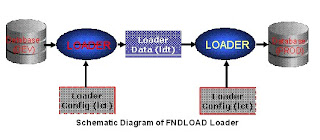
If I want to generate a ldt file I ran this command
FNDLOAD apps/aaaa@cost O Y DOWNLOAD $GL_TOP/patch/115/import/glnlsacc.lct glnlsacc.ldt GL_ACC_CALENDAR PERIOD_SET_NAME="POWER-ONE"
Before running this I have make sure that I have set the environment variable.
I have made sure the current directory is editable.
Log filename : L2165634.log
Report filename : O2165634.out
Log file and out file got generated.vi the log file in linux you will see the below template
Application Object Library: Version : 11.5.0
Copyright (c) 1979, 1999, Oracle Corporation. All rights reserved.
module:
+---------------------------------------------------------------------------+
Current system time is 20-DEC-2010 06:47:26
+---------------------------------------------------------------------------+
Downloading GL_ACC_CALENDAR to the data file glnlsacc.ldt
Downloaded GL_ACC_CALENDAR POWER-ONE
+---------------------------------------------------------------------------+
Concurrent request completed successfully
Current system time is 20-DEC-2010 06:47:26
+---------------------------------------------------------------------------+
The log says it has downloaded
See the sample ldt file
===================================================
# $Header$
#
LANGUAGE = "US"
LDRCONFIG = "glnlsacc.lct 115.1"
#Source Database COST
#RELEASE_NAME 11.5.10.2
# -- Begin Entity Definitions --
DEFINE GL_ACC_CALENDAR
KEY PERIOD_SET_NAME VARCHAR2(15)
CTX OWNER VARCHAR2(6)
BASE ATTRIBUTE1 VARCHAR2(150)
BASE ATTRIBUTE2 VARCHAR2(150)
BASE ATTRIBUTE3 VARCHAR2(150)
BASE ATTRIBUTE4 VARCHAR2(150)
BASE ATTRIBUTE5 VARCHAR2(150)
BASE CONTEXT VARCHAR2(150)
BASE DESCRIPTION VARCHAR2(240)
DEFINE GL_PERIODS
KEY PERIOD_NAME VARCHAR2(15)
CTX OWNER VARCHAR2(6)
BASE START_DATE VARCHAR2(15)
BASE END_DATE VARCHAR2(15)
BASE PERIOD_TYPE VARCHAR2(15)
BASE PERIOD_YEAR NUMBER(22)
BASE PERIOD_NUM NUMBER(22)
BASE QUARTER_NUM NUMBER(22)
BASE ENTERED_PERIOD_NAME VARCHAR2(15)
BASE ADJUSTMENT_PERIOD_FLAG VARCHAR2(1)
BASE CONTEXT VARCHAR2(150)
BASE DESCRIPTION VARCHAR2(240)
BASE ATTRIBUTE1 VARCHAR2(150)
BASE ATTRIBUTE2 VARCHAR2(150)
BASE ATTRIBUTE3 VARCHAR2(150)
BASE ATTRIBUTE4 VARCHAR2(150)
BASE ATTRIBUTE5 VARCHAR2(150)
BASE ATTRIBUTE6 VARCHAR2(150)
BASE ATTRIBUTE7 VARCHAR2(150)
BASE ATTRIBUTE8 VARCHAR2(150)
END GL_PERIODS
END GL_ACC_CALENDAR
# -- End Entity Definitions --
BEGIN GL_ACC_CALENDAR "POWER-ONE"
OWNER = "CUSTOM"
DESCRIPTION = "POWER-ONE CALENDAR"
BEGIN GL_PERIODS "NOV-96"
OWNER = "CUSTOM"
START_DATE = "1996/10/28"
END_DATE = "1996/11/24"
PERIOD_TYPE = "1"
PERIOD_YEAR = "1996"
PERIOD_NUM = "11"
QUARTER_NUM = "4"
ENTERED_PERIOD_NAME = "NOV"
ADJUSTMENT_PERIOD_FLAG = "N"
END GL_PERIODS
BEGIN GL_PERIODS "DEC-96"
OWNER = "CUSTOM"
START_DATE = "1996/11/25"
END_DATE = "1996/12/29"
PERIOD_TYPE = "1"
PERIOD_YEAR = "1996"
PERIOD_NUM = "12"
QUARTER_NUM = "4"
ENTERED_PERIOD_NAME = "DEC"
ADJUSTMENT_PERIOD_FLAG = "N"
END GL_PERIODS
BEGIN GL_PERIODS "ADJ-96"
OWNER = "CUSTOM"
START_DATE = "1996/12/29"
END_DATE = "1996/12/29"
PERIOD_TYPE = "1"
PERIOD_YEAR = "1996"
PERIOD_NUM = "13"
QUARTER_NUM = "4"
ENTERED_PERIOD_NAME = "ADJ"
ADJUSTMENT_PERIOD_FLAG = "Y"
END GL_PERIODS
BEGIN GL_PERIODS "JAN-97"
OWNER = "CUSTOM"
START_DATE = "1996/12/30"
END_DATE = "1997/01/26"
PERIOD_TYPE = "1"
PERIOD_YEAR = "1997"
PERIOD_NUM = "1"
QUARTER_NUM = "1"
ENTERED_PERIOD_NAME = "JAN"
ADJUSTMENT_PERIOD_FLAG = "N"
END GL_PERIODS
BEGIN GL_PERIODS "FEB-97"
OWNER = "CUSTOM"
START_DATE = "1997/01/27"
END_DATE = "1997/02/23"
PERIOD_TYPE = "1"
PERIOD_YEAR = "1997"
PERIOD_NUM = "2"
QUARTER_NUM = "1"
ENTERED_PERIOD_NAME = "FEB"
ADJUSTMENT_PERIOD_FLAG = "N"
END GL_PERIODS
……………………. Goes on
END GL_ACC_CALENDAR
=============================================================
we have set environmental variable first
from admin folder run fndload. run envinomental variable from appl_top path . ./*.env
While Uploading:
Uploading from the data file c:\tabular.ldt
Altering database NLS_LANGUAGE environment to AMERICAN
Dump from LCT/LDT files (d:\oracle\prodappl\fnd\11.5.0\patch\115\import\afcpprog.lct(115.39), c:\tabular.ldt) to stage tables
Dump LCT file d:\oracle\prodappl\fnd\11.5.0\patch\115\import\afcpprog.lct(115.39) into FND_SEED_STAGE_CONFIG
Dump LDT file c:\tabular.ldt into FND_SEED_STAGE_ENTITY
No data found for upload ------> /*if error this message will be shown*/
*********************************************
Enter: D:\oracle\prodappl\fnd\11.5.0\bin>fndload apps/apps@prod 0 Y UPLOAD d:\oracle\prodappl\ fnd\11.5.0\patch\115\import\afcpprog.lct c:\jb.ldt
Log filename : L2753692.log
Report filename : O2753692.out
Enter: D:\oracle\prodappl\fnd\11.5.0\bin>type L2753692.log
***************************************
Uploading from the data file c:\jb.ldt
Altering database NLS_LANGUAGE environment to AMERICAN
Dump from LCT/LDT files (d:\oracle\prodappl\fnd\11.5.0\patch\115\import\afcpprog.lct(115.39), c:\jb.ldt) to stage tables
Dump LCT file d:\oracle\prodappl\fnd\11.5.0\patch\115\import\afcpprog.lct(115.39
) into FND_SEED_STAGE_CONFIG
Dump LDT file c:\jb.ldt into FND_SEED_STAGE_ENTITY
Dumped the batch (EXECUTABLE SAMPLE1 SQLAP , PROGRAM JB_SAMPLE1_PRG SQLAP ) into
FND_SEED_STAGE_ENTITY
Upload from stage tables ------->/* if it is correct*/
+---------------------------------------------------------------------------+
Concurrent request completed successfully
Current system time is 29-MAR-2008 16:52:39
+---------------------------------------------------------------------------+
FND Objects that seeded LCT files available.
Responsibility
FND User
Value Set
Value Set with Values
Profile Option
Profile Option Setup without Values
Profile Option at Responsibility level
Message
Concurrent Program
Request Group
Request Group Unit
Request Set
Request Set Links
Forms
Forms Function
Forms Personalization
Menu
Menu: Submenu
DFF
DFF Context Code
KFF
Lookup Type
Printer
Printer Style
Printer Driver
Printer Type
Workflow
Alerts
Concurrent Queues
Audit Groups
XMLPublisher Templates
Sample Commands for few Entities
1 - Printer Styles
FNDLOAD apps/apps@seed115 O Y DOWNLOAD $FND_TOP/patch/115/import/afcppstl.lct file_name.ldt STYLE PRINTER_STYLE_NAME="printer style name"
2 - Lookups
FNDLOAD apps/apps@seed115 O Y DOWNLOAD $FND_TOP/patch/115/import/aflvmlu.lct file_name.ldt FND_LOOKUP_TYPE APPLICATION_SHORT_NAME="prod" LOOKUP_TYPE="lookup name"
3 - Descriptive Flexfield with all of specific Contexts
FNDLOAD apps/apps@seed115 O Y DOWNLOAD $FND_TOP/patch/115/import/afffload.lct file_name.ldt DESC_FLEX P_LEVEL=?COL_ALL:REF_ALL:CTX_ONE:SEG_ALL? APPLICATION_SHORT_NAME="prod" DESCRIPTIVE_FLEXFIELD_NAME="desc flex name" P_CONTEXT_CODE="context name"
4 - Key Flexfield Structures
FNDLOAD apps/apps@seed115 O Y DOWNLOAD $FND_TOP/patch/115/import/afffload.lct file_name.ldt KEY_FLEX P_LEVEL=?COL_ALL:FQL_ALL:SQL_ALL:STR_ONE:WFP_ALL:SHA_ALL:CVR_ALL:SEG_ALL? APPLICATION_SHORT_NAME="prod" ID_FLEX_CODE="key flex code" P_STRUCTURE_CODE="structure name"
5 - Concurrent Programs
FNDLOAD apps/apps@seed115 O Y DOWNLOAD $FND_TOP/patch/115/import/afcpprog.lct file_name.ldt PROGRAM APPLICATION_SHORT_NAME="prod" CONCURRENT_PROGRAM_NAME="concurrent name"
6 - Value Sets
FNDLOAD apps/apps@seed115 O Y DOWNLOAD $FND_TOP/patch/115/import/afffload.lct file_name.ldt VALUE_SET FLEX_VALUE_SET_NAME="value set name"
7 - Value Sets with values
FNDLOAD apps/apps@seed115 O Y DOWNLOAD $FND_TOP/patch/115/import/afffload.lct file_name.ldt VALUE_SET_VALUE FLEX_VALUE_SET_NAME="value set name"
8 - Profile Options
FNDLOAD apps/apps@seed115 O Y DOWNLOAD $FND_TOP/patch/115/import/afscprof.lct file_name.ldt PROFILE PROFILE_NAME="profile option" APPLICATION_SHORT_NAME="prod"
9 - Requset Group
FNDLOAD apps/apps@seed115 O Y DOWNLOAD $FND_TOP/patch/115/import/afcpreqg.lct file_name.ldt REQUEST_GROUP REQUEST_GROUP_NAME="request group" APPLICATION_SHORT_NAME="prod"
10 - Request Sets
FNDLOAD apps/apps@seed115 O Y DOWNLOAD $FND_TOP/patch/115/import/afcprset.lct file_name.ldt REQ_SET APPLICATION_SHORT_NAME="prod" REQUEST_SET_NAME="request set"
11 - Responsibilities
FNDLOAD apps/apps@seed115 O Y DOWNLOAD $FND_TOP/patch/115/import/afscursp.lct file_name.ldt FND_RESPONSIBILITY RESP_KEY="responsibility
12 - Menus
FNDLOAD apps/apps@seed115 O Y DOWNLOAD $FND_TOP/patch/115/import/afsload.lct file_name.ldt MENU MENU_NAME="menu_name"
13 – Forms/Functions
FNDLOAD apps/apps@seed115 0 Y DOWNLOAD $FND_TOP/patch/115/import/affrmcus.lct file_name.ldt FND_FORM_CUSTOM_RULES The Upload syntax for all styles: FNDLOAD apps/apps@seed115 0 Y UPLOAD $FND_TOP/patch/115/import/affrmcus.lct file_name.ldt
14. User/Responsibilities
FNDLOAD apps/apps@seed115 0 Y DOWNLOAD @FND:patch/115/import/afscursp.lct file_name.ldt FND_USER Then UPLOAD FNDLOAD apps/apps@seed115 0 Y UPLOAD [UPLOAD_PARTIAL] @FND:patch/115/import/afscursp.lct file_name.ldt FND_USER [USER]
References:
• Oracle Applications Systems Administrator’s Guide
• Metalink Notes: 117084.1, 228614.1 232029.1 , 274667.1
Modification of Seeded LCT files are not recommended.
We can built our own LCT files for any setups.
This is a utility provided by oracle which is useful for migration of an entity from one instance to another instance.
An entity I mean here is a setup for example defining a concurrent program is a setup, defing a buyers is a setup.
This utility will help us when we need a particular setup needs to be moved from an instance to instance. As we know we will have multiple instances in our work environment to work on like PROD, TEST, DEV, and CRP...Etc.Imagine if I need to create a gl code combinations setup from my CRP instance to TEST instance.How much man hours I need for this.FNDLOAD will help here to move this setup from instance to instance in just 5 mins with help of 2 commands.
How FNDLOAD works is we have lct files for each entity and use a particular lct file for the setup.
A brief explanation about the LCT file:
Here I will take a GL Accounting Calendar setup for an example.
# FILENAME
# glnlsacc.lct
# PURPOSE
# GL Accounting Calendar Loader Configuration
# ENTITY
# GL_ACC_CALENDAR
If I need to move period set name LCT will automatically take care of the dependencies like periods.
In the same way if we are trying to load the concurrent program to another instances.LCT will take care of its dependencies like Exectables, valuesets, incompatabilies, parameters...etc
Firstly we will find the define section where all the attributes will be defined here.
Attributes here are our database columns.
Here Period set name is our parent entity and under it there is a child entity period name.
# -- DEFINE SECTION --
#
# Use this section to specify the structure of the entities.
#
# ID column values are not portable. Use an equivalent text value instead.
# For example, use APPLICATION_SHORT_NAME instead of APPLICATION_ID.
#
# DATE and NUMBER datatypes should be defined and stored as VARCHAR2(11)
# and VARCHAR2(50), respectively.
#
# The OWNER field is used to store and determine the values of the
# "WHO" columns.
# /* $Header: glnlsacc.lct 115.1 2002/10/21 05:59:36 nkasu noship $ */
DEFINE GL_ACC_CALENDAR
KEY PERIOD_SET_NAME VARCHAR2(15)
CTX OWNER VARCHAR2(6)
BASE ATTRIBUTE1 VARCHAR2(150)
BASE ATTRIBUTE2 VARCHAR2(150)
BASE ATTRIBUTE3 VARCHAR2(150)
BASE ATTRIBUTE4 VARCHAR2(150)
BASE ATTRIBUTE5 VARCHAR2(150)
BASE CONTEXT VARCHAR2(150)
BASE DESCRIPTION VARCHAR2(240)
DEFINE GL_PERIODS
KEY PERIOD_NAME VARCHAR2(15)
CTX OWNER VARCHAR2(6)
BASE START_DATE VARCHAR2(15)
BASE END_DATE VARCHAR2(15)
BASE PERIOD_TYPE VARCHAR2(15)
BASE PERIOD_YEAR NUMBER
BASE PERIOD_NUM NUMBER
BASE QUARTER_NUM NUMBER
BASE ENTERED_PERIOD_NAME VARCHAR2(15)
BASE ADJUSTMENT_PERIOD_FLAG VARCHAR2(1)
BASE CONTEXT VARCHAR2(150)
BASE DESCRIPTION VARCHAR2(240)
BASE ATTRIBUTE1 VARCHAR2(150)
BASE ATTRIBUTE2 VARCHAR2(150)
BASE ATTRIBUTE3 VARCHAR2(150)
BASE ATTRIBUTE4 VARCHAR2(150)
BASE ATTRIBUTE5 VARCHAR2(150)
BASE ATTRIBUTE6 VARCHAR2(150)
BASE ATTRIBUTE7 VARCHAR2(150)
BASE ATTRIBUTE8 VARCHAR2(150)
END GL_PERIODS
END GL_ACC_CALENDAR
Here starts our Download section
Its just a sql statements.Here all our key attributes can be used as parameters and its optional is you are not passing it will run for all the data.
# -- DOWNLOAD SECTION --
#
# For each entity, specify the SQL statement to use to flesh out
# its entity definition. SELECT columns must be in same order and
# datatype as the entity's attributes as defined above.
#
# Convert dates to varchar2 using:
# to_char(sysdate, 'DD/MM/YYYY')
#
# Wrap parameter values with nvl() to support null parameter passing
#
DOWNLOAD GL_ACC_CALENDAR
"select period_set_name,
decode(LAST_UPDATED_BY, 1, 'SEED', 'CUSTOM') OWNER,
ATTRIBUTE1,
ATTRIBUTE2,
ATTRIBUTE3,
ATTRIBUTE4,
ATTRIBUTE5,
CONTEXT,
DESCRIPTION
from GL_PERIOD_SETS
where period_set_name like nvl( :PERIOD_SET_NAME, '%')"
DOWNLOAD GL_PERIODS
"select period_name,
decode(LAST_UPDATED_BY, 1, 'SEED', 'CUSTOM') OWNER,
to_char(start_date,'YYYY/MM/DD'),
to_char(end_date,'YYYY/MM/DD'),
period_type,
period_year,
period_num,
quarter_num,
entered_period_name,
adjustment_period_flag,
context,
description,
attribute1,
attribute2,
attribute3,
attribute4,
attribute5,
attribute6,
attribute7,
attribute8
from gl_periods_v
where period_set_name like nvl( :PERIOD_SET_NAME, '%')"
UPLOAD section
Mostly oracle uses API for inserting.
# -- UPLOAD section --
#
# For each entity, specify the pl/sql block to use to upload the
# entity into the database. Bind names must match DEFINE attribute names.
# If the relevant tables have table handlers defined, use the LOAD_ROW
# procedure.
#
# Non-leaf entities must include the BEGIN keyword.
#
# Child entities may use bind names from their parents' definitions.
# Use command line parameters to control branching between desired behavior.
# For example, in the upload statement below, we use the parameter
# UPLOAD_MODE to specify whether we are doing a regular upload or a
# special upload of translated columns.
#
UPLOAD GL_ACC_CALENDAR
BEGIN
" begin
gl_period_sets_pkg.Load_Row(
X_Period_Set_Name => :period_set_name,
X_Owner => :owner,
X_Description => :description,
X_Context => :context,
X_Attribute1 => :attribute1,
X_Attribute2 => :attribute2,
X_Attribute3 => :attribute3,
X_Attribute4 => :attribute4,
X_Attribute5 => :attribute5);
end; "
UPLOAD GL_PERIODS
" begin
gl_periods_pkg.Load_Row(
X_Period_Set_Name => :period_set_name,
X_Period_Name => :period_name,
X_Owner => :owner,
X_Start_Date => :start_date,
X_End_Date => :end_date,
X_Period_Type => :period_type,
X_Period_Year => :period_year,
X_Period_Num => :period_num,
X_Quarter_Num => :quarter_num,
X_Entered_Period_Name => :entered_period_name,
X_Description => :description,
X_Attribute1 => :attribute1,
X_Attribute2 => :attribute2,
X_Attribute3 => :attribute3,
X_Attribute4 => :attribute4,
X_Attribute5 => :attribute5,
X_Attribute6 => :attribute6,
X_Attribute7 => :attribute7,
X_Attribute8 => :attribute8,
X_Context => :context,
X_Adjustment_Period_Flag => :adjustment_period_flag );
end;"
By This we have complted a glance on how lct file built.
How to use this
FNDLOAD apps/pwd 0 Y mode configfile datafile entity
[ param ... ]
Where
apps/pwd The APPS schema and password in the form If
connect_string is omitted, it is taken in a
platform–specific manner from the environment
using the name TWO_TASK.
0 Y Concurrent program flags
mode UPLOAD or DOWNLOAD. UPLOAD causes the
Data file to be uploaded to the database.
DOWNLOAD causes the loader to fetch rows and
write them to the data file.
Configfile The configuration file to use (usually with a suffix
of .lct, but not enforced or supplied by the loader).
datafile The data file to write (usually with a suffix of .ldt,
but not enforced or supplied by the loader). If the
data file already exists, it will be overwritten.
entity The entity(ies) to upload or download. When uploading, you should always upload all entities, so specify a ”–” to upload all entities.
[param] Zero or more additional parameters are used to provide bind values in the access SQL (both UPLOAD and DOWNLOAD). Each parameter is in the form NAME=VALUE. NAME should not conflict with an attribute name for the entities being loaded.
File Specifications
The configuration file and data file parameters are specified in one of
two ways:
@application_short_name>:[dir/.../]file.ext
For example,
@fnd/11i/loader/fndapp.lct
@po:install/data/poreq.ldt
Alternatively, the parameters can be specified as such:
native path
mydata.ldt
c:\loader\config\cfg102.lct
If we run FNDLAOD with DOWNLOAD parameter it will expect the file name in which it has extract the data from database and write.That we generally call as ldt file.
It is in a editable format
IF you run FNDLOAD with UPLOAD and ldt file name as parameters it will use API’s and any insert options to insert into data from ldt file to DB.

If I want to generate a ldt file I ran this command
FNDLOAD apps/aaaa@cost O Y DOWNLOAD $GL_TOP/patch/115/import/glnlsacc.lct glnlsacc.ldt GL_ACC_CALENDAR PERIOD_SET_NAME="POWER-ONE"
Before running this I have make sure that I have set the environment variable.
I have made sure the current directory is editable.
Log filename : L2165634.log
Report filename : O2165634.out
Log file and out file got generated.vi the log file in linux you will see the below template
Application Object Library: Version : 11.5.0
Copyright (c) 1979, 1999, Oracle Corporation. All rights reserved.
module:
+---------------------------------------------------------------------------+
Current system time is 20-DEC-2010 06:47:26
+---------------------------------------------------------------------------+
Downloading GL_ACC_CALENDAR to the data file glnlsacc.ldt
Downloaded GL_ACC_CALENDAR POWER-ONE
+---------------------------------------------------------------------------+
Concurrent request completed successfully
Current system time is 20-DEC-2010 06:47:26
+---------------------------------------------------------------------------+
The log says it has downloaded
See the sample ldt file
===================================================
# $Header$
#
LANGUAGE = "US"
LDRCONFIG = "glnlsacc.lct 115.1"
#Source Database COST
#RELEASE_NAME 11.5.10.2
# -- Begin Entity Definitions --
DEFINE GL_ACC_CALENDAR
KEY PERIOD_SET_NAME VARCHAR2(15)
CTX OWNER VARCHAR2(6)
BASE ATTRIBUTE1 VARCHAR2(150)
BASE ATTRIBUTE2 VARCHAR2(150)
BASE ATTRIBUTE3 VARCHAR2(150)
BASE ATTRIBUTE4 VARCHAR2(150)
BASE ATTRIBUTE5 VARCHAR2(150)
BASE CONTEXT VARCHAR2(150)
BASE DESCRIPTION VARCHAR2(240)
DEFINE GL_PERIODS
KEY PERIOD_NAME VARCHAR2(15)
CTX OWNER VARCHAR2(6)
BASE START_DATE VARCHAR2(15)
BASE END_DATE VARCHAR2(15)
BASE PERIOD_TYPE VARCHAR2(15)
BASE PERIOD_YEAR NUMBER(22)
BASE PERIOD_NUM NUMBER(22)
BASE QUARTER_NUM NUMBER(22)
BASE ENTERED_PERIOD_NAME VARCHAR2(15)
BASE ADJUSTMENT_PERIOD_FLAG VARCHAR2(1)
BASE CONTEXT VARCHAR2(150)
BASE DESCRIPTION VARCHAR2(240)
BASE ATTRIBUTE1 VARCHAR2(150)
BASE ATTRIBUTE2 VARCHAR2(150)
BASE ATTRIBUTE3 VARCHAR2(150)
BASE ATTRIBUTE4 VARCHAR2(150)
BASE ATTRIBUTE5 VARCHAR2(150)
BASE ATTRIBUTE6 VARCHAR2(150)
BASE ATTRIBUTE7 VARCHAR2(150)
BASE ATTRIBUTE8 VARCHAR2(150)
END GL_PERIODS
END GL_ACC_CALENDAR
# -- End Entity Definitions --
BEGIN GL_ACC_CALENDAR "POWER-ONE"
OWNER = "CUSTOM"
DESCRIPTION = "POWER-ONE CALENDAR"
BEGIN GL_PERIODS "NOV-96"
OWNER = "CUSTOM"
START_DATE = "1996/10/28"
END_DATE = "1996/11/24"
PERIOD_TYPE = "1"
PERIOD_YEAR = "1996"
PERIOD_NUM = "11"
QUARTER_NUM = "4"
ENTERED_PERIOD_NAME = "NOV"
ADJUSTMENT_PERIOD_FLAG = "N"
END GL_PERIODS
BEGIN GL_PERIODS "DEC-96"
OWNER = "CUSTOM"
START_DATE = "1996/11/25"
END_DATE = "1996/12/29"
PERIOD_TYPE = "1"
PERIOD_YEAR = "1996"
PERIOD_NUM = "12"
QUARTER_NUM = "4"
ENTERED_PERIOD_NAME = "DEC"
ADJUSTMENT_PERIOD_FLAG = "N"
END GL_PERIODS
BEGIN GL_PERIODS "ADJ-96"
OWNER = "CUSTOM"
START_DATE = "1996/12/29"
END_DATE = "1996/12/29"
PERIOD_TYPE = "1"
PERIOD_YEAR = "1996"
PERIOD_NUM = "13"
QUARTER_NUM = "4"
ENTERED_PERIOD_NAME = "ADJ"
ADJUSTMENT_PERIOD_FLAG = "Y"
END GL_PERIODS
BEGIN GL_PERIODS "JAN-97"
OWNER = "CUSTOM"
START_DATE = "1996/12/30"
END_DATE = "1997/01/26"
PERIOD_TYPE = "1"
PERIOD_YEAR = "1997"
PERIOD_NUM = "1"
QUARTER_NUM = "1"
ENTERED_PERIOD_NAME = "JAN"
ADJUSTMENT_PERIOD_FLAG = "N"
END GL_PERIODS
BEGIN GL_PERIODS "FEB-97"
OWNER = "CUSTOM"
START_DATE = "1997/01/27"
END_DATE = "1997/02/23"
PERIOD_TYPE = "1"
PERIOD_YEAR = "1997"
PERIOD_NUM = "2"
QUARTER_NUM = "1"
ENTERED_PERIOD_NAME = "FEB"
ADJUSTMENT_PERIOD_FLAG = "N"
END GL_PERIODS
……………………. Goes on
END GL_ACC_CALENDAR
=============================================================
we have set environmental variable first
from admin folder run fndload. run envinomental variable from appl_top path . ./*.env
While Uploading:
Uploading from the data file c:\tabular.ldt
Altering database NLS_LANGUAGE environment to AMERICAN
Dump from LCT/LDT files (d:\oracle\prodappl\fnd\11.5.0\patch\115\import\afcpprog.lct(115.39), c:\tabular.ldt) to stage tables
Dump LCT file d:\oracle\prodappl\fnd\11.5.0\patch\115\import\afcpprog.lct(115.39) into FND_SEED_STAGE_CONFIG
Dump LDT file c:\tabular.ldt into FND_SEED_STAGE_ENTITY
No data found for upload ------> /*if error this message will be shown*/
*********************************************
Enter: D:\oracle\prodappl\fnd\11.5.0\bin>fndload apps/apps@prod 0 Y UPLOAD d:\oracle\prodappl\ fnd\11.5.0\patch\115\import\afcpprog.lct c:\jb.ldt
Log filename : L2753692.log
Report filename : O2753692.out
Enter: D:\oracle\prodappl\fnd\11.5.0\bin>type L2753692.log
***************************************
Uploading from the data file c:\jb.ldt
Altering database NLS_LANGUAGE environment to AMERICAN
Dump from LCT/LDT files (d:\oracle\prodappl\fnd\11.5.0\patch\115\import\afcpprog.lct(115.39), c:\jb.ldt) to stage tables
Dump LCT file d:\oracle\prodappl\fnd\11.5.0\patch\115\import\afcpprog.lct(115.39
) into FND_SEED_STAGE_CONFIG
Dump LDT file c:\jb.ldt into FND_SEED_STAGE_ENTITY
Dumped the batch (EXECUTABLE SAMPLE1 SQLAP , PROGRAM JB_SAMPLE1_PRG SQLAP ) into
FND_SEED_STAGE_ENTITY
Upload from stage tables ------->/* if it is correct*/
+---------------------------------------------------------------------------+
Concurrent request completed successfully
Current system time is 29-MAR-2008 16:52:39
+---------------------------------------------------------------------------+
FND Objects that seeded LCT files available.
Responsibility
FND User
Value Set
Value Set with Values
Profile Option
Profile Option Setup without Values
Profile Option at Responsibility level
Message
Concurrent Program
Request Group
Request Group Unit
Request Set
Request Set Links
Forms
Forms Function
Forms Personalization
Menu
Menu: Submenu
DFF
DFF Context Code
KFF
Lookup Type
Printer
Printer Style
Printer Driver
Printer Type
Workflow
Alerts
Concurrent Queues
Audit Groups
XMLPublisher Templates
Sample Commands for few Entities
1 - Printer Styles
FNDLOAD apps/apps@seed115 O Y DOWNLOAD $FND_TOP/patch/115/import/afcppstl.lct file_name.ldt STYLE PRINTER_STYLE_NAME="printer style name"
2 - Lookups
FNDLOAD apps/apps@seed115 O Y DOWNLOAD $FND_TOP/patch/115/import/aflvmlu.lct file_name.ldt FND_LOOKUP_TYPE APPLICATION_SHORT_NAME="prod" LOOKUP_TYPE="lookup name"
3 - Descriptive Flexfield with all of specific Contexts
FNDLOAD apps/apps@seed115 O Y DOWNLOAD $FND_TOP/patch/115/import/afffload.lct file_name.ldt DESC_FLEX P_LEVEL=?COL_ALL:REF_ALL:CTX_ONE:SEG_ALL? APPLICATION_SHORT_NAME="prod" DESCRIPTIVE_FLEXFIELD_NAME="desc flex name" P_CONTEXT_CODE="context name"
4 - Key Flexfield Structures
FNDLOAD apps/apps@seed115 O Y DOWNLOAD $FND_TOP/patch/115/import/afffload.lct file_name.ldt KEY_FLEX P_LEVEL=?COL_ALL:FQL_ALL:SQL_ALL:STR_ONE:WFP_ALL:SHA_ALL:CVR_ALL:SEG_ALL? APPLICATION_SHORT_NAME="prod" ID_FLEX_CODE="key flex code" P_STRUCTURE_CODE="structure name"
5 - Concurrent Programs
FNDLOAD apps/apps@seed115 O Y DOWNLOAD $FND_TOP/patch/115/import/afcpprog.lct file_name.ldt PROGRAM APPLICATION_SHORT_NAME="prod" CONCURRENT_PROGRAM_NAME="concurrent name"
6 - Value Sets
FNDLOAD apps/apps@seed115 O Y DOWNLOAD $FND_TOP/patch/115/import/afffload.lct file_name.ldt VALUE_SET FLEX_VALUE_SET_NAME="value set name"
7 - Value Sets with values
FNDLOAD apps/apps@seed115 O Y DOWNLOAD $FND_TOP/patch/115/import/afffload.lct file_name.ldt VALUE_SET_VALUE FLEX_VALUE_SET_NAME="value set name"
8 - Profile Options
FNDLOAD apps/apps@seed115 O Y DOWNLOAD $FND_TOP/patch/115/import/afscprof.lct file_name.ldt PROFILE PROFILE_NAME="profile option" APPLICATION_SHORT_NAME="prod"
9 - Requset Group
FNDLOAD apps/apps@seed115 O Y DOWNLOAD $FND_TOP/patch/115/import/afcpreqg.lct file_name.ldt REQUEST_GROUP REQUEST_GROUP_NAME="request group" APPLICATION_SHORT_NAME="prod"
10 - Request Sets
FNDLOAD apps/apps@seed115 O Y DOWNLOAD $FND_TOP/patch/115/import/afcprset.lct file_name.ldt REQ_SET APPLICATION_SHORT_NAME="prod" REQUEST_SET_NAME="request set"
11 - Responsibilities
FNDLOAD apps/apps@seed115 O Y DOWNLOAD $FND_TOP/patch/115/import/afscursp.lct file_name.ldt FND_RESPONSIBILITY RESP_KEY="responsibility
12 - Menus
FNDLOAD apps/apps@seed115 O Y DOWNLOAD $FND_TOP/patch/115/import/afsload.lct file_name.ldt MENU MENU_NAME="menu_name"
13 – Forms/Functions
FNDLOAD apps/apps@seed115 0 Y DOWNLOAD $FND_TOP/patch/115/import/affrmcus.lct file_name.ldt FND_FORM_CUSTOM_RULES The Upload syntax for all styles: FNDLOAD apps/apps@seed115 0 Y UPLOAD $FND_TOP/patch/115/import/affrmcus.lct file_name.ldt
14. User/Responsibilities
FNDLOAD apps/apps@seed115 0 Y DOWNLOAD @FND:patch/115/import/afscursp.lct file_name.ldt FND_USER Then UPLOAD FNDLOAD apps/apps@seed115 0 Y UPLOAD [UPLOAD_PARTIAL] @FND:patch/115/import/afscursp.lct file_name.ldt FND_USER [USER]
References:
• Oracle Applications Systems Administrator’s Guide
• Metalink Notes: 117084.1, 228614.1 232029.1 , 274667.1
Modification of Seeded LCT files are not recommended.
We can built our own LCT files for any setups.
Subscribe to:
Posts (Atom)